The last post got through 1.26. 1.27 was approved much faster than I expected. The Watch app is a piece I actually wanted on my own wrist, so that one’s below. 1.28 is the sample rate. 1.29 puts the piano on its own stem and takes MIDI past eight.
Piano, and room for more MIDI
A 6-stem split was already hearing the piano, then throwing that output away. It never landed on a layer, and it wasn’t in with the other instruments either. Mute the vocals on a piano-and-vocal song and the piano went with them. It has its own layer now. Thanks to sim for catching that in their bug report!
On the MIDI side of things, MIDI previously stopped at 8 tracks max. Pro can now take that to 100, and each lane plays an instrument in the project or goes out to a device. On the crate side, a track with 8 layers of custom patches measured about 40% lighter, so the same song can hold more of them.
48 kHz
The NAM model in the amp is trained at 48 kHz, and the plugin chain already runs there. The session was still opening at 44.1, so monitoring converted into that chain on every block. New songs request 48, and Settings, Audio has the default: Follow device, 44.1, or 48. A project stores its own rate, and the header shows it.
AirPods were opening as a phone call. That’s HFP, mono at 16 or 24 kHz, and iOS takes it over A2DP whenever a playAndRecord session allows Bluetooth. The recorder leaves that option off, so the headphones stay on A2DP at 48 kHz stereo. Arming a track on the headset mic turns HFP on, which is when that mic shows up in the input list.
The stock drum kit got a new render, with the balance printed into the wavs and pad pan at unity in the center, same law as a track. A limiter sits after the kit volume, stereo linked, ceiling around -0.5 dBFS, back to unity in about 50 ms. The new files carry a _v2 suffix, and a project pointing at homecrate_kick2.wav loads that file when it’s on the device.
The recorder, from your wrist
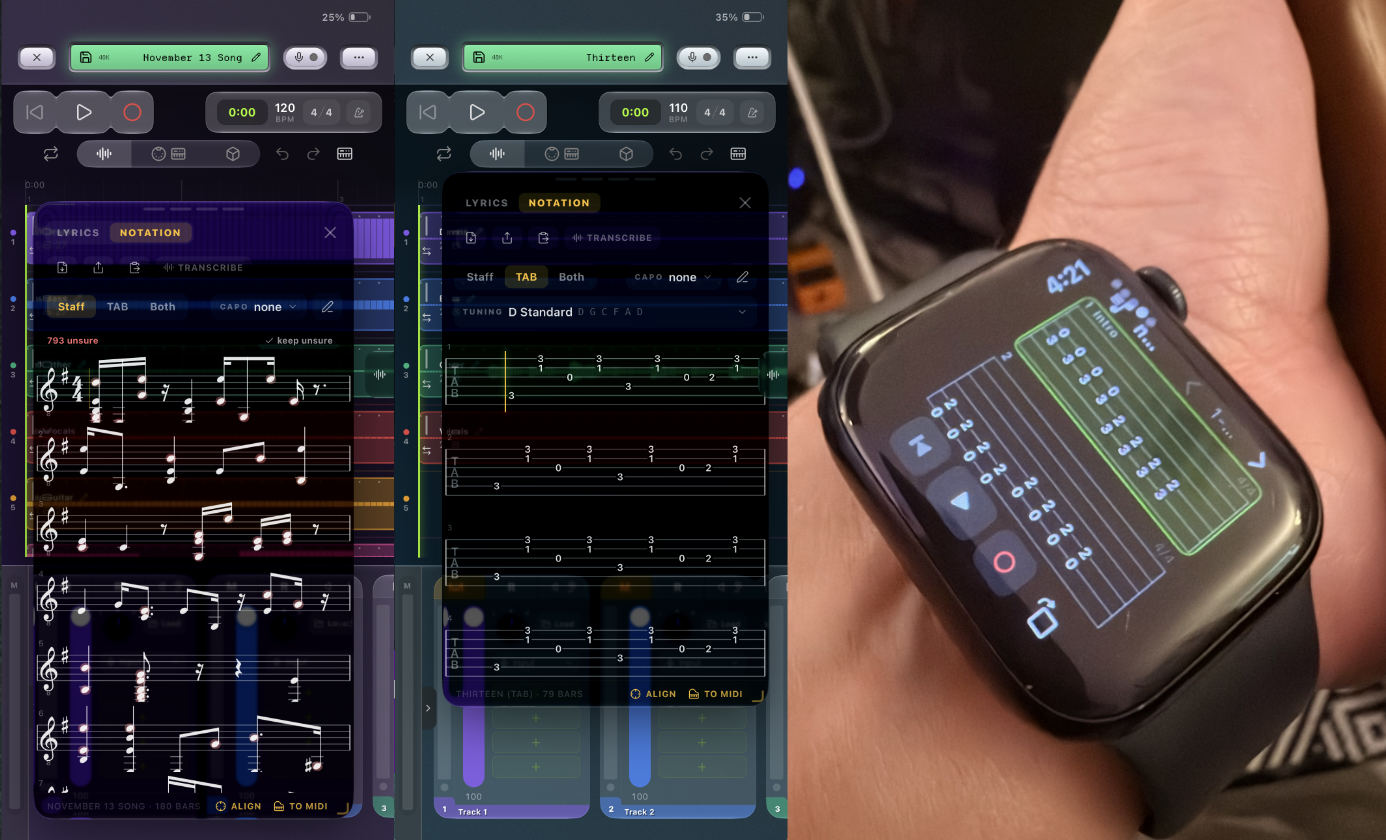
The Watch app is now finished and gives five mini app pages, swiped top to bottom: tuner, voice, metronome, the score, and the player.
Voice and the score carry the recorder’s three transport keys: play, record, and back. Back cancels the take while you’re recording, stops while you’re playing, and rewinds when you’re stopped. If the recorder isn’t open, or the phone is following someone else’s session, the keys go dark and say why. The session host owns the transport, so the watch doesn’t pretend otherwise.
Voice listens on the Watch’s microphone, then the clip goes to the phone, the phone transcribes it, and the phone runs the command. The phone’s own mic and the session that’s already playing are left alone. A command from the wrist does the same thing as one from the mic in the recorder header, including count-me-in. If it wants a yes before it changes anything, confirm and cancel are on the watch, and there’s a keyboard button if you’d rather type it.
The recorder has to be open to a project for the Watch to sync. Voice commands need Pro, and they stay off when Hide AI is on. The listen switch survives leaving the voice page, wrist down included, as long as the Watch app is the one in front. The tuner and the voice share one mic, so voice waits while you’re tuning.
The last page is the player: art, title, play, and the Digital Crown scrubs. As you would probably expect.
Tuner and metronome
The tuner listens on the Watch. The known tunings are compiled into the watch app, and the phone sends across the tuning you have selected plus any you’ve saved, temperament included. The open G on the phone is the open G on your wrist. The face turns sideways so the dial can use the long side. It keeps listening with your wrist down while the app is still in front: both hands on the guitar, watch against your sleeve, and it’s still hearing the string.
The metronome runs on the watch, with tempo on the Digital Crown, tap tempo, a time signature, accents, and a haptic as the pendulum crosses center. Presets saved on the phone come over with it. While it’s clicking it tries to stay awake with your wrist down, so looking at the fretboard doesn’t kill the click. Raise your wrist and a session that did fall asleep starts again.
Notation, on the phone and on the watch
The lyrics panel has a Notation side: staff, TAB, or both. You can write it in yourself: a length, a string, a fret, and the note lands and the cursor steps on. Dotted notes, rests, and chords by staying on the beat and stacking another string. You can paste MusicXML, or import a MusicXML file. Capo and tuning come with it, and the frets count from the capo.
The way a score usually gets in there is from the song: long-press a lane number and choose Transcribe to notation, and it opens the panel and writes that lane over whatever score is there.
A MIDI lane is the notes as they play. A bend that lands on another pitch becomes a slide, and a bend that comes back stays a bend. The fretting is the closest shape that fits the tuning, pulled toward where the hand already was. Fix a chord in the panel if the shape is wrong.
An audio lane is heard three ways, and they check each other: a sung line, the chords, and a plain melody. Auto uses the line when the part is mostly one note at a time, and the chords when it isn’t. An octave slip the other two disagree with gets moved, a short note nobody else heard gets dropped, and a held note the line missed, that the other two both heard, gets put back. Drums are left out, since there’s nothing pitched to write. Notes the chord pass added show up in blue to review, and you can change them.
Timing can follow the playing, which finds the beats in the take, so it doesn’t have to have been recorded to a click, or it can sit on the project grid.
That score is what the Watch draws and syncs real time. Two measures at a time, turned so a measure runs along the face, and the measure you’re in glows. There is no playhead, so the watch counts from the last position the phone sent, which is enough to know the bar, and it keeps counting while the screen is dim. TAB is fingered the same way as on the phone. The first verse’s syllables sit on the chords.
Songs you’ve starred/favorited stay on the watch, plus the five most recent besides those, so a chart comes back with the phone’s app closed. A song that isn’t the one open in the recorder plays on the watch’s own clock, muted, at full speed or at three quarters, half, or a quarter, with a one-bar count-in, for learning a passage. A beat pulse is there if you want the click in your wrist.
The assistant, rewritten
Chat in the recorder’s More menu is a new on device agent that can interact with the DAW, this is not generative AI, this is acessibility. It reads the song, writes a short plan from the same actions an outside agent can take, runs that plan, and the message you get back is what those steps did. Not what the model claimed they did. Voice commands go through it, including the ones from the Watch. Deletes, and plans longer than three steps, still ask first. This means that someone with physical reasons for not being able to interact with the DAW can use natural language to insert clips in a certain key with a certain feel.
It runs on the device and needs Apple’s on-device model. If the chat is missing from the menu, the phone doesn’t have that model. Hide AI still hides it.
The old assistant is still there, under Recorder settings, General tab, Use Legacy Chat. That opens the older chat window, and voice commands use the older assistant. I’m leaving the switch until the new one has been lived with.
As of 1.28 it reads a recorded lane off disk and writes a part from the chords in that file. Describing a loaded plugin’s tone writes to that plugin’s parameters. As of 1.29 a song it writes is split by section. The chorus keeps its own chords, and when that chorus comes back it’s the same one.
More for an agent to write
MCP can drive the music generator now, on top of writing notes one by one. An agent can ask for a chord progression, a bassline, a melody, an arpeggio, or a drum pattern, and name a feel: laid-back, driving, sparse, dark, tense, melancholic, uplifting, playful. Walking is its own word, for a bassline. Chords can be held, pulsed, offbeat, or stabbed. A melody can be sparse or busy, low or high, phrased in fours, or built on a motif that repeats over the chords. After it writes, tidy goes through the clip: notes past the end, doubled notes, leaps over an octave, off-key notes sitting on strong beats.
It can also write a part under a clip that’s already there: bass, melody, chords, or keys, on a free MIDI track, fitted to that clip. Drum patterns and that accompaniment need Apple Intelligence on the device. If you already know the notes, have it write those. The generator is for when you don’t.
A clip you can turn off
Long-press a clip and Disable leaves it on the timeline and takes it out of the sound. Playback, the backing while you record, and a bounce all skip it. The clips after it keep playing, and it doesn’t pull a fade out of the one before it. Enable puts it back. Before this, getting a clip out of the mix meant sending it to the drawer.
The drawer’s Global library takes several audio files in one import. A file that can’t be read is skipped, and the rest still come in. Search keeps a clip when its name holds every word you typed, twenty-four to a page. Long-press one and Pin to Page 1, and your favorites stay at the front, in the order you pinned them, and search still includes the pins. The audio tab has a preview volume, so a hot sample doesn’t audition at full level.
Fixes
A take recorded with monitoring on could play back slow. The music player sometimes leaves the route at 96 or 192 kHz, and a take written up there doesn’t match what the recorder plays, so recordings stay at a rate the recorder can play. The way out before was to disarm monitoring and arm it again.
The metronome stays with playback in the cases where it had drifted off the clock.
Play in the recorder was starting whatever song was sitting in the music player. The player holds its play intent through a stall, so when the recorder took the session that song woke up under the transport. The library is held while the recorder is open, unless it was actually playing when you opened the recorder. Close the recorder and the song is where you left it, paused.
The full list is on the changelog.
Still a one time purchase
One purchase, iOS and macOS and visionOS. No subscription, no account, no ads. Everything above is included for anyone who already bought it.
If homecrate has been useful to you, a rating on the App Store genuinely helps more than you’d think. Settings has a link for it. It’s still one person working on this.