a music player for people who buy the record. And for those that make them.

your music. your crate.

A local library player and a pocket studio, built for musicians and audiophiles, not for charts and corpo-algorithms.

Your files. Your taste. Your recordings. Everything on device, no accounts, no tracking, no cloud lock-in. Built for the people who still read the liner notes.

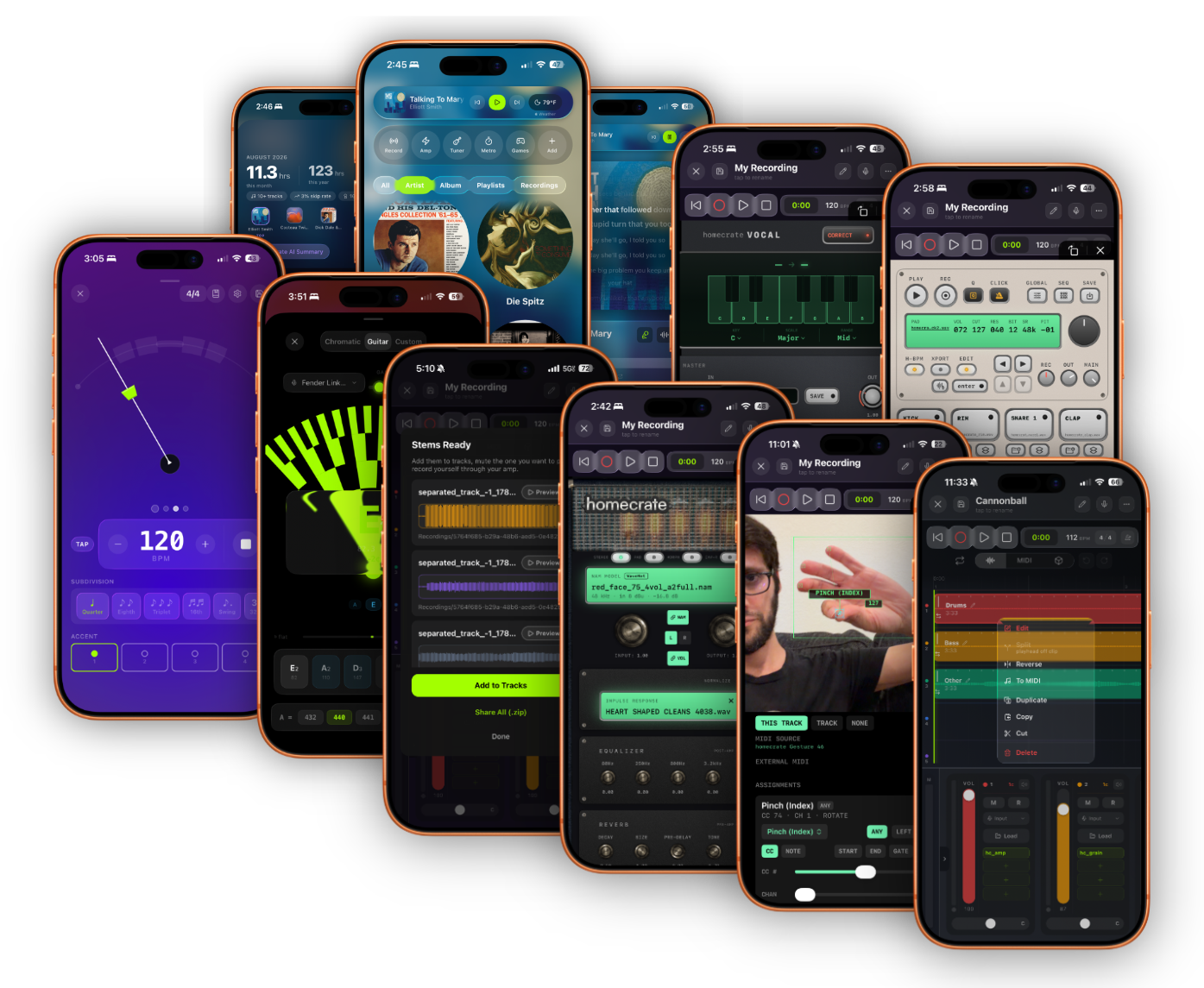
for musicians. informed, not generative. no subscription. homecrate across iPhone: player, recorder, amp, tuner
Free
Download
$9.99
One-time pro unlock
0
Subscriptions. Ever.
100%
On-device (non-generative) Intelligence
“Refreshingly, the free version also comes without artificial feature restrictions – something increasingly rare in modern music apps.”
MusicTech

Streaming made music convenient. It also made it forgettable. homecrate is for the people who still have a favorite pressing, who read the sleeve before the track list, who prefer a shelf to an algorithm, who make the music.

Free · always
01 the player

A local
library player.

The tape deck in your pocket, with a good librarian behind it.

4 tracks free · pro $9.99 once
02 the studio

A pocket
studio.

The 4-track on the rehearsal floor, now with a brain and a voice.

01 the player

The stuff
in the sleeve.

Everything a record used to come with (liner notes, band members, lyrics, discographies) tucked into a player that actually remembers what you like.

Library Intelligence

Ask your
library anything.

Your collection is the training set. Not the internet.

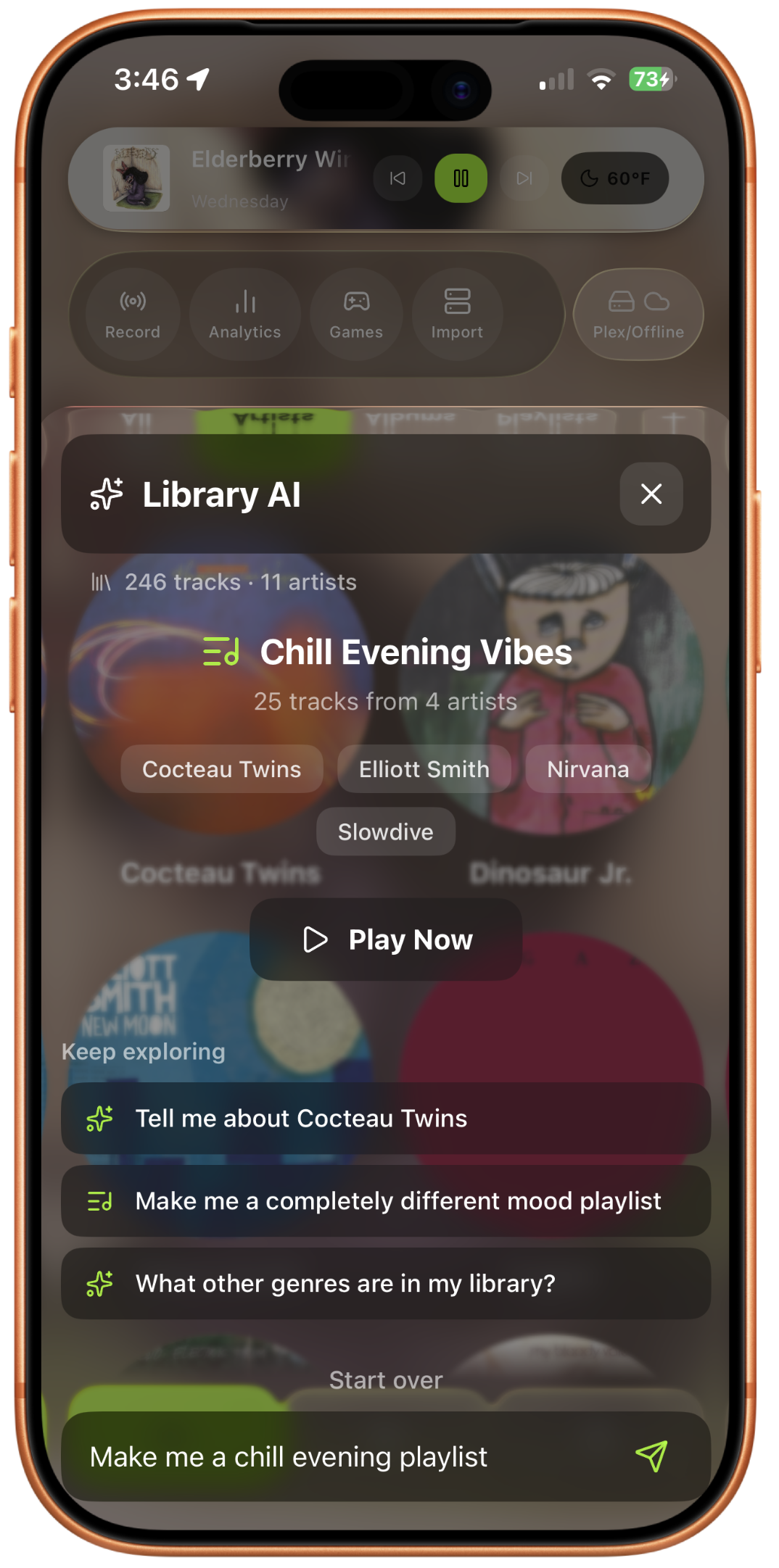
A librarian, not a recommender. It answers questions that are actually about your music: who's in the band, which albums you've skipped, what you reach for on Sunday mornings. Grounded in your files. Processed on your phone.

  • Band member search: "anything with Willie Nelson in it"
  • Mood-aware playlists from real audio analysis
  • Listening habits: peak hours, repeat offenders
  • No accounts, no tracking, no cloud inference
Pro
ask anything. on-device. always. Library Intelligence: chill evening vibes playlist generated on-device
an honest algorithm. you set it.
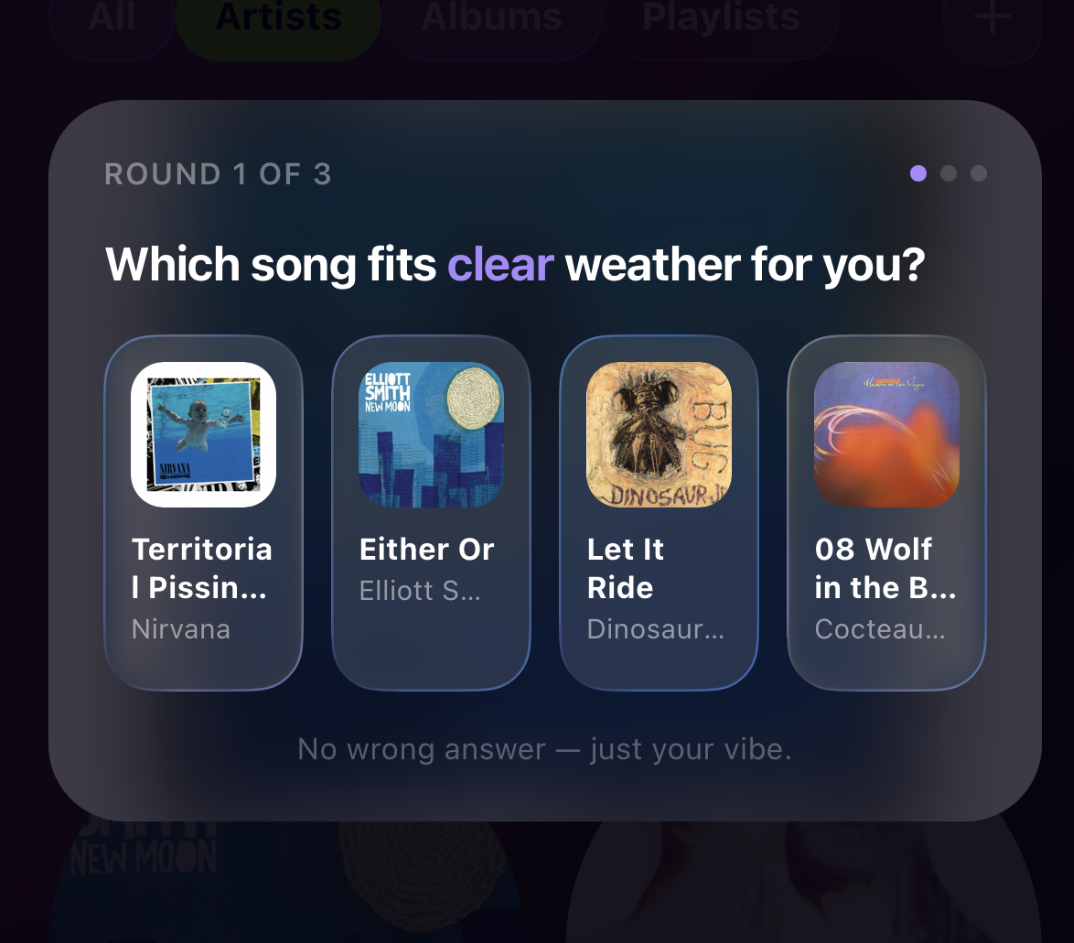
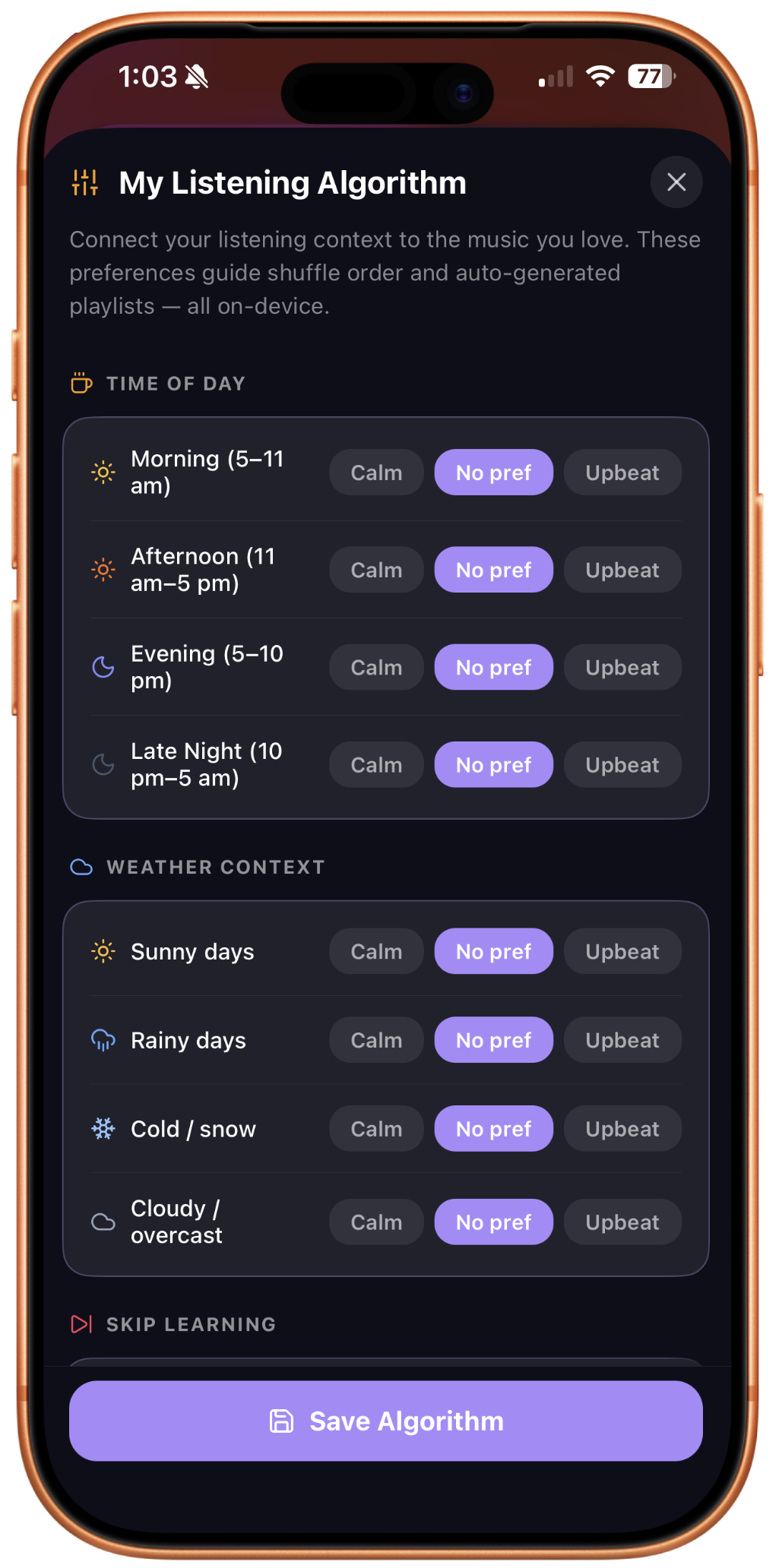
Weather Mood game: pick a song that fits clear weather Listening Algorithm: time of day, weather context, skip learning
Algo Tuner & Weather Mood

You set it.
The queue
reflects it.

No black-box "for you" page. Real sliders, real rules, one live weather game.

Three sliders you can see. A no-repeat window you can enforce. A tiny daily game that looks at the weather, gives you three songs, and uses your pick to lightly steer what plays next. The algorithm is a musician's tool, not a corporation's growth lever.

  • Discovery, energy, mood, and frequency as sliders
  • No repeats for X days, your choice
  • Weather Mood nudges "Up Next" without interrupting now-playing
  • Save presets: Sunday morning. Dog walk. Last call.
Free
Liner Notes & Analytics

The stuff
in the sleeve.

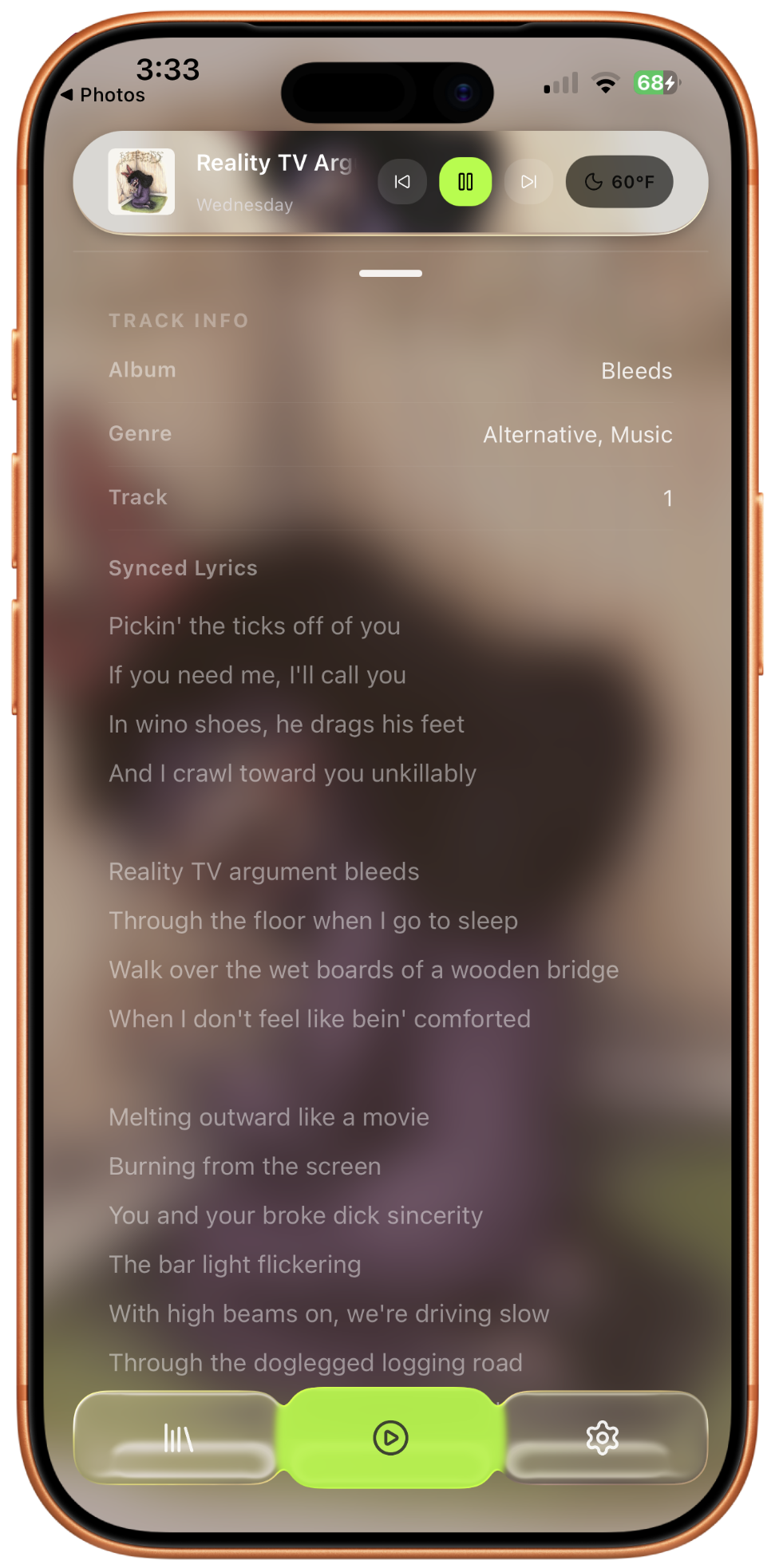
Metadata for millions of songs. Line-synced lyrics out of the box. Grounded answers only.

Import a zip of FLACs and get word-by-word lyrics, verified biographies, band members, discographies, pulled from a curated database, not hallucinated. The system cites its sources, and admits when it doesn't know. Liner notes for the people who read them.

  • Synced word-by-word lyrics on import
  • Verified artist bio, members, origin, albums
  • Per-track music theory analysis
  • Personal analytics, on-device only: peak hour, skip rate, mood map
Free
metadata for millions of songs. read the sleeve. Liner notes: track info, synced lyrics for Reality TV Argument Bleeds
02 the studio · 4 tracks free

There's a
studio in here
too.

Four tracks free, sixteen with Pro. Voice control. A neural amp. Stem separation and audio-to-MIDI, on-device, unlimited: the kind of thing other apps meter through the cloud. The full signal chain from practice through release, in your pocket.

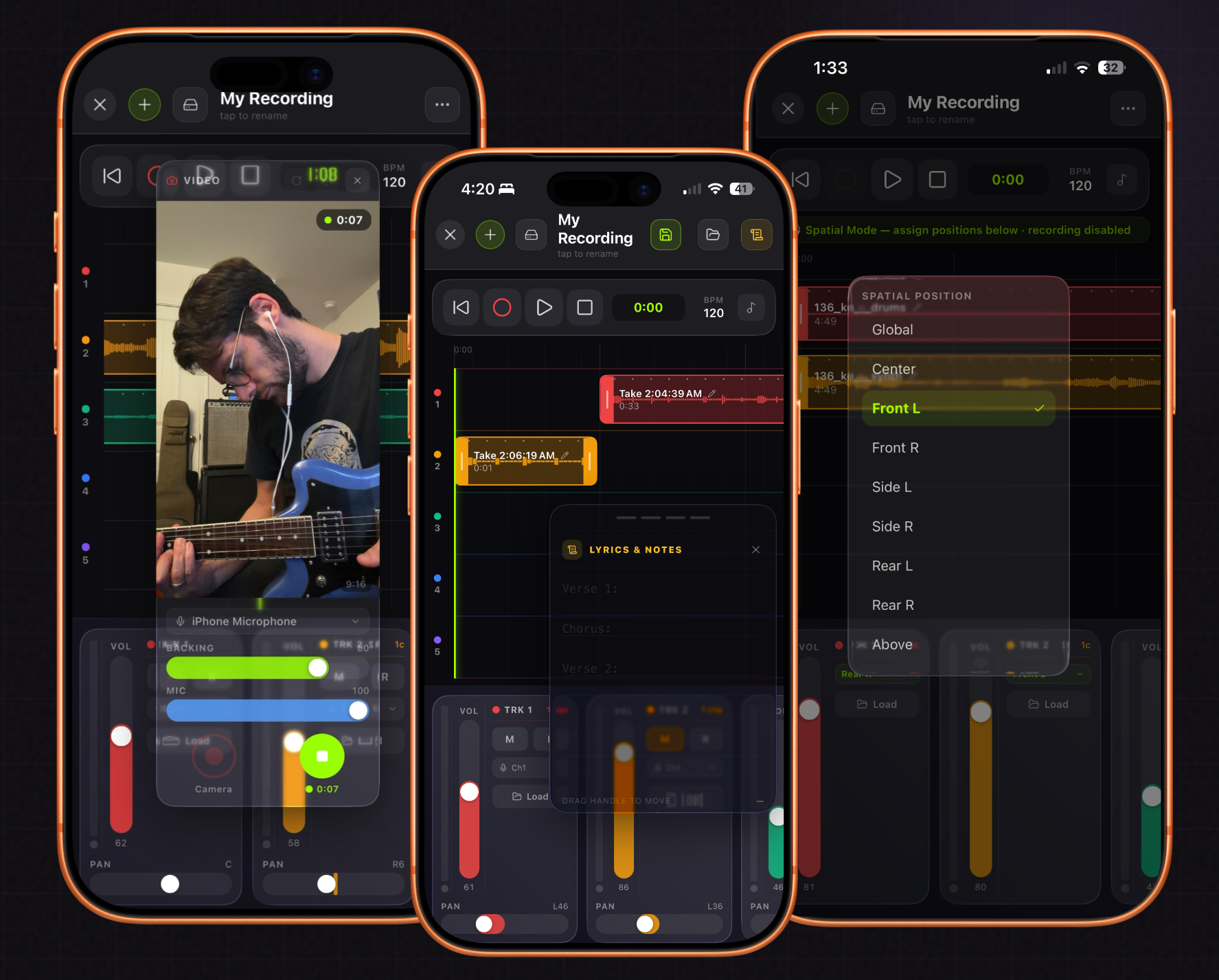
16 tracks. stereo or spatial. homecrate recorder: multitrack with lyrics & notes
homecrate Studio

Sixteen tracks.
One pocket.
Full DAW.

A full mobile DAW inside the music player. What you make is yours, saved as a hidden track, kept out of your listening algo.

The rehearsal room fits in your bag. Latency-compensated overdubs. AUv3 plugin host. Per-channel USB-C interface support. Export to stereo, or to Apple APAC spatial on iOS 26.

  • Projects open with 8 tracks, expandable to 16 with a tap
  • Master track: its own volume & plugin chain for stereo mastering
  • Per-channel USB audio interface support
  • Latency-compensated overdubbing
  • AUv3 plugin host: any third-party plugin
  • Mixdown to library: stereo or spatial
Pro
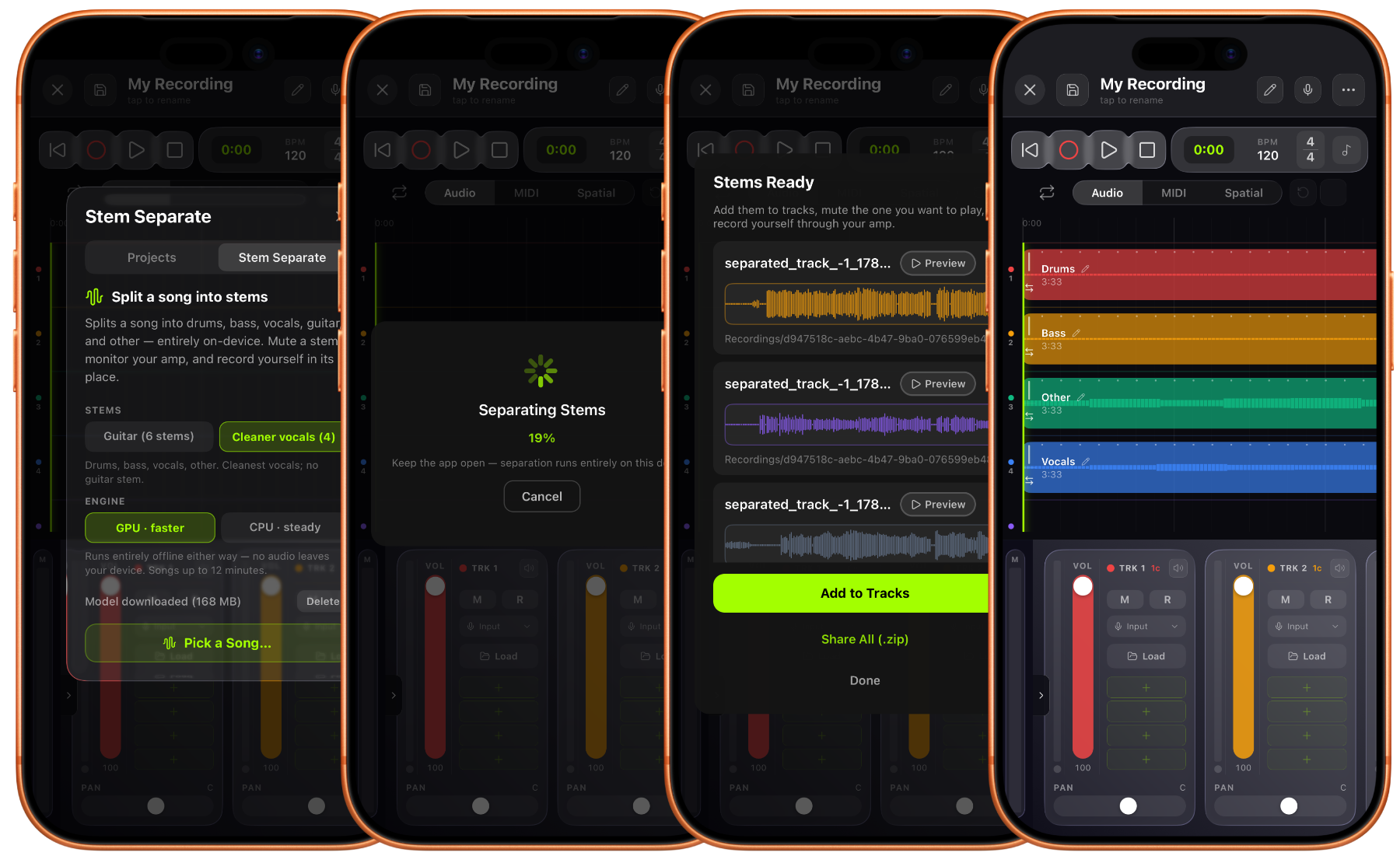
no upload. no credits. split it. sing it. Stem separation: splitting a song into drums, bass, other, and vocals, then adding them to tracks
Stem separation & audio-to-MIDI

Split any song.
Learn any part.

The biggest update yet: features other apps meter through the cloud, running unlimited and offline, right on your phone.

Split any song into stems, right on your iOS device, no upload, no monthly cap, no account. Pick the GPU engine for speed on modern devices or CPU for broad compatibility, and a 4-stem or 6-stem model (with its own dedicated guitar stem). Stems land already aligned on the timeline. Mute the guitar, put the amp on a track, hit record, and learn the song yourself, as many times as you want.

  • 4-stem or 6-stem (dedicated guitar) on-device models
  • GPU engine for speed, CPU engine for any device
  • Stems land aligned on tracks, ready to mute, solo, or play along with
  • Audio-to-MIDI: convert any clip to notes from the clip editor
  • On-device pitch detection, built for vocals & isolated instruments
Pro
Voice control

Talk to
the DAW.

Hands on the instrument. Voice on the DAW. Informed, not generative.

Say what you need while you're playing: arm a track, move a clip, change the tempo, generate a MIDI part. Over twenty studio commands, interpreted by on-device intelligence. No cloud, no wake word required during a take.

  • Always-listening (pauses during record) or press-to-talk
  • Transport, track, clip, and plugin control by voice
  • Confirmation prompts before destructive actions
  • MIDI generation from a sentence
  • On-device Intelligence, with a switch to turn it off
Pro
count me in from the top. informed, not generative. Voice-controlled DAW: export mixdown, open project, lyrics, tuner, chat, 3D spatial mode
Neural amp modeler · AUv3

Tone that travels
with the player.

NAM A2 neural amp modeling built into the recorder. Now in dual mode. Cross-app plugin that follows you anywhere.

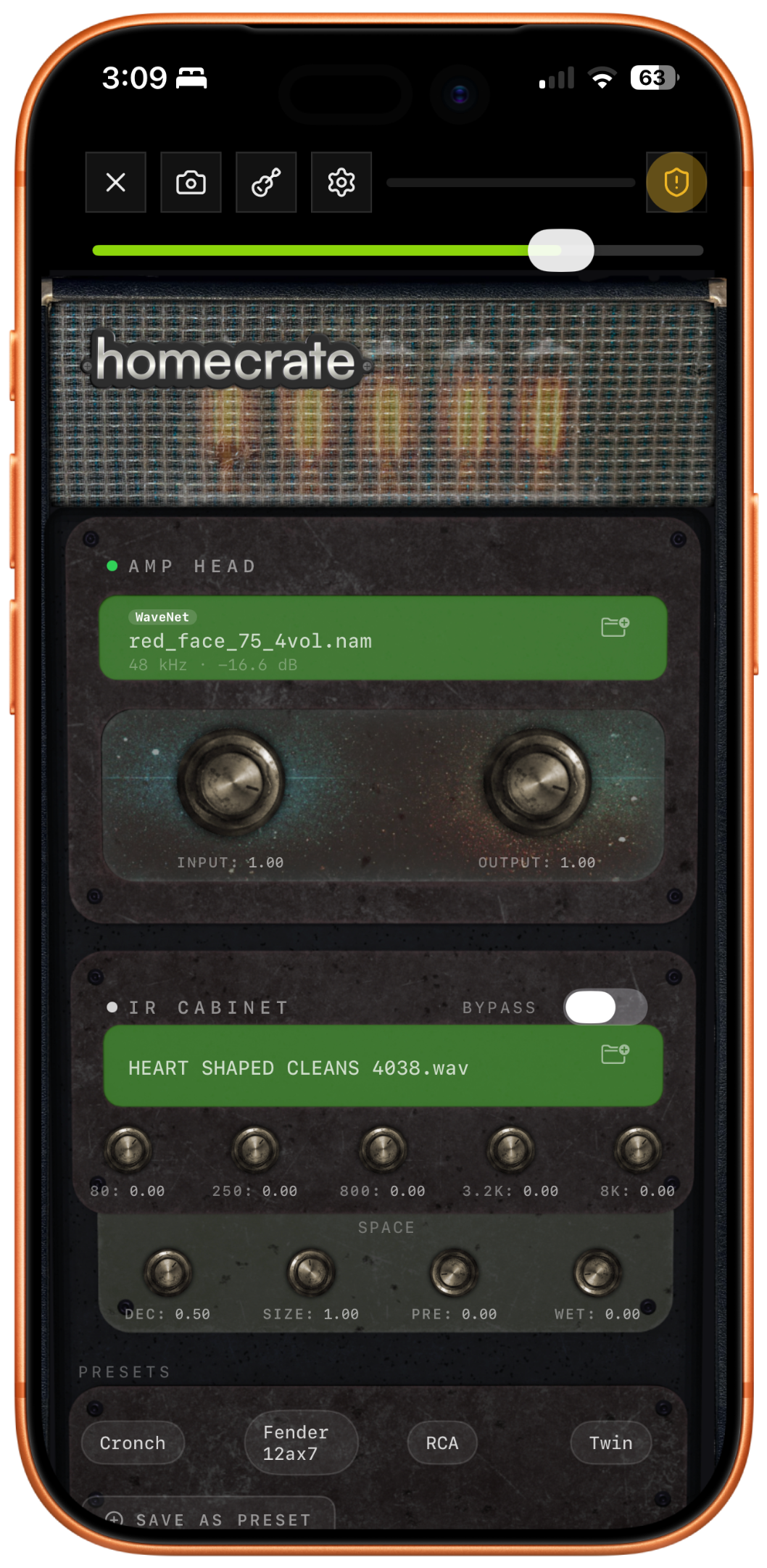
Neural Amp Modeler A2 under the recorder's hood, more accurate, more efficient, better feel than the previous generation. Dual NAM or IR mode lets you map your playing dynamics to a blend between two amps or two cabs live. Stereo mode runs linked or fully independent L/R profiles. Also works as an AUv3 in any other iOS DAW. homecrate never leaves your signal chain.

  • NAM A2 neural amp modeling, mono or stereo
  • Dual NAM/IR mode: dynamics-mapped blend between two amps or cabs
  • Delay: mono/stereo, ping-pong, tape, duck, tempo-synced
  • EQ & reverb assignable pre or post amp, reverb noise gate
  • IR cabinet loading from any .wav
  • AUv3 cross-app: works in any iOS host
Pro
The plugin rack

Complete
production rack, plus
everyone else's.

Seven AUv3s that load without Pro, plus two Pro-only ones: hands-to-MIDI gesture control, and a door to every VST3 and Audio Unit that exists.

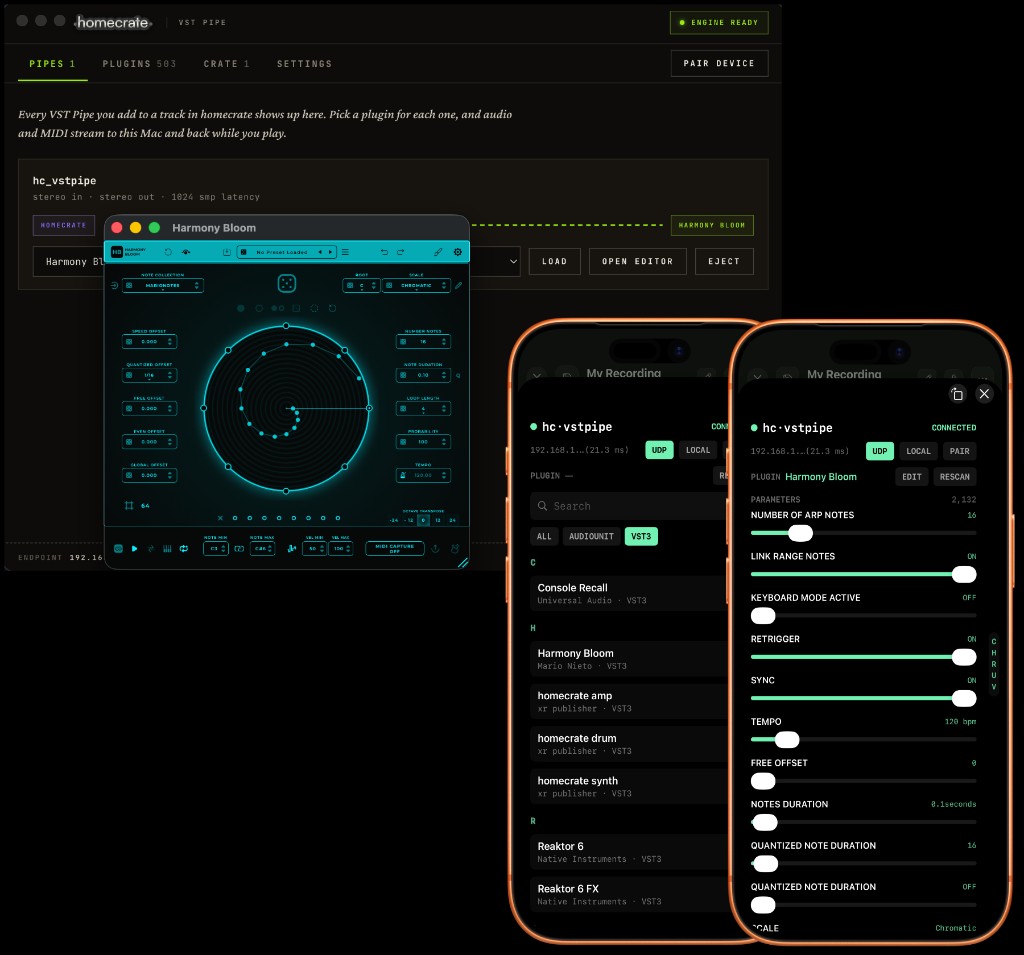
homecrate vocal handles pitch, compression, doubling, de-essing, and reverb in one strip. dynEQ and send give you real sidechaining: trigger a dynamic EQ from any track for classic ducking and pumping. All of them load and run on the free tier with their factory presets; saving your own presets, loading custom IRs and the full grain degrade suite come with Pro. vstpipe is Pro only: it streams audio, MIDI, and transport to a companion app on your Mac, which hosts your real VST3 or Audio Unit plugin and streams it back, at low latency, with parameters that automate right inside the clip editor.

  • homecrate vocal: pitch correction, comp, doubling, de-esser, reverb (free)
  • homecrate dynEQ: dynamic EQ + compressor with sidechaining (free)
  • homecrate send: drives dynEQ from any track's signal (free)
  • homecrate grain: granular reverb and delay, 3 presets free
  • Saving your own presets, kits and patches (Pro)
  • homecrate vstpipe: real VST3 / AU hosting via a companion Mac app (Pro)
↓ Get the homecrate Companion App FREE · macOS Pro
your mac's vst3s. from your phone. vstpipe: Harmony Bloom VST3 hosted on a Mac, streamed to and controlled from homecrate on iPhone
Video & camera FX

The room falls
apart. You don't.

Sixty-two real-time effects on the camera, stacked like a signal chain — and two shields that keep you and your instrument out of the wreckage.

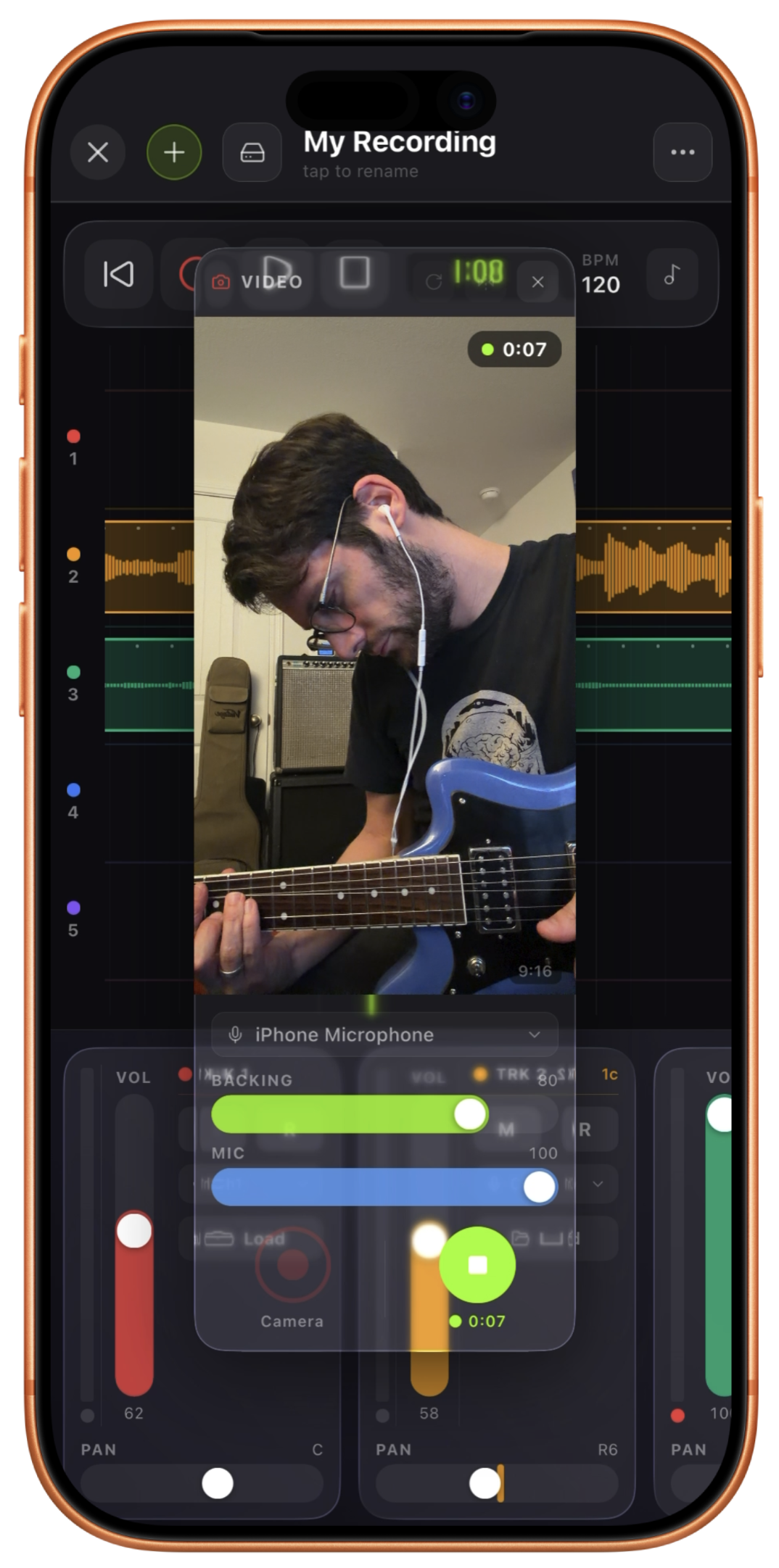

Film the take with your backing tracks playing and the finished video comes back already mixed against your studio audio. Effects layer on top of each other and run in order, live on the viewfinder before you ever hit record. Then the part nothing else does: Preserve Me keeps the performer untouched while the room datamoshes, melts or burns around them — and Preserve Instrument does the same for the guitar in your hands. Flip either one and you become the effect while the room stays real.

  • 70 effects on the GPU, layered with per-layer blend and controls
  • Preserve Me & Preserve Instrument, each invertible
  • Per-layer choice of what it's allowed to touch: you, the instrument, both, or neither
  • Effects that move with your playing — dig in and the frame reacts
  • 23 factory looks, save your own, last rig restores itself
  • Front, back, or both cameras at once · 9:16 · 1:1 · 4:5 · 16:9
Pro
the world shreds. while you and your instrument are protected. Video FX: 70 effects on the GPU, layered with per-layer blend and controls
Spatial audio

Put the band
around you.

Spectral binaural engine. Per-track position, in a new 3D view. APAC export on iOS 26, now with video.

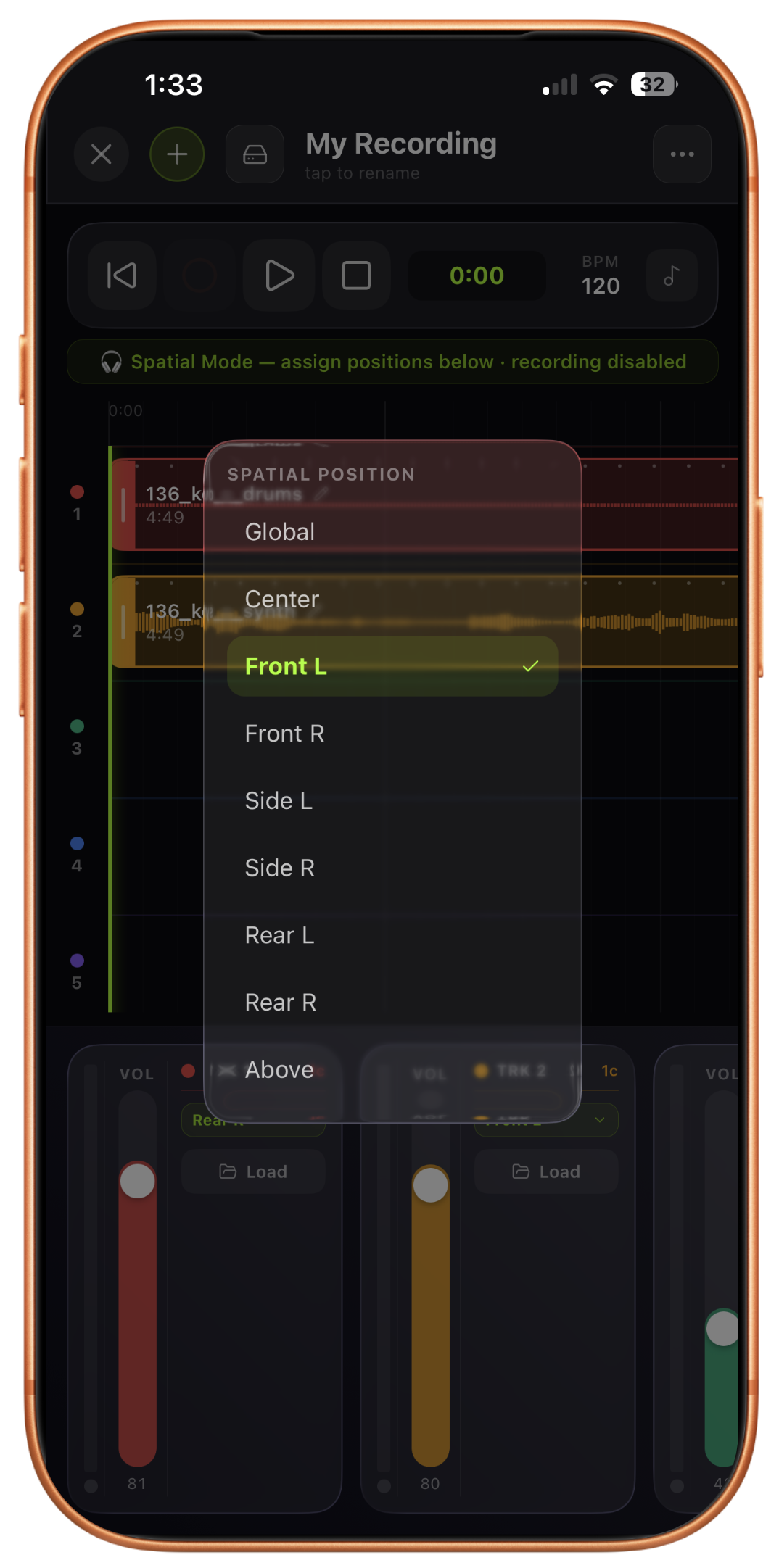
Drop the rhythm guitar behind your left shoulder. Put the vocal front and center. Place the drums a step back. Spatial positioning runs live, drift-corrected, and toggles per-track without pausing playback. Draw a track's position on the timeline so a sound moves through the mix over time. Export as APAC on iOS 26+ with an optional video file attached for spatial audio/video, or stereo with spatial metadata on earlier devices.

  • New 3D view for the spatial editor
  • Position automation: draw movement on the timeline
  • Attach video for combined spatial audio/video export
  • APAC export on iOS 26+, stereo fallback everywhere else
Pro
3d spatial studio. put the band around you. Spatial mode, assign positions: Global, Center, Front L/R, Side L/R, Rear L/R, Above
Theory Intelligence · Drum Machine
Theory Intelligence & Drum Machine

Ask for
a riff.

On‑device theory. Knows your key, your tempo, your chord grid. Answers with MIDI, not mush.

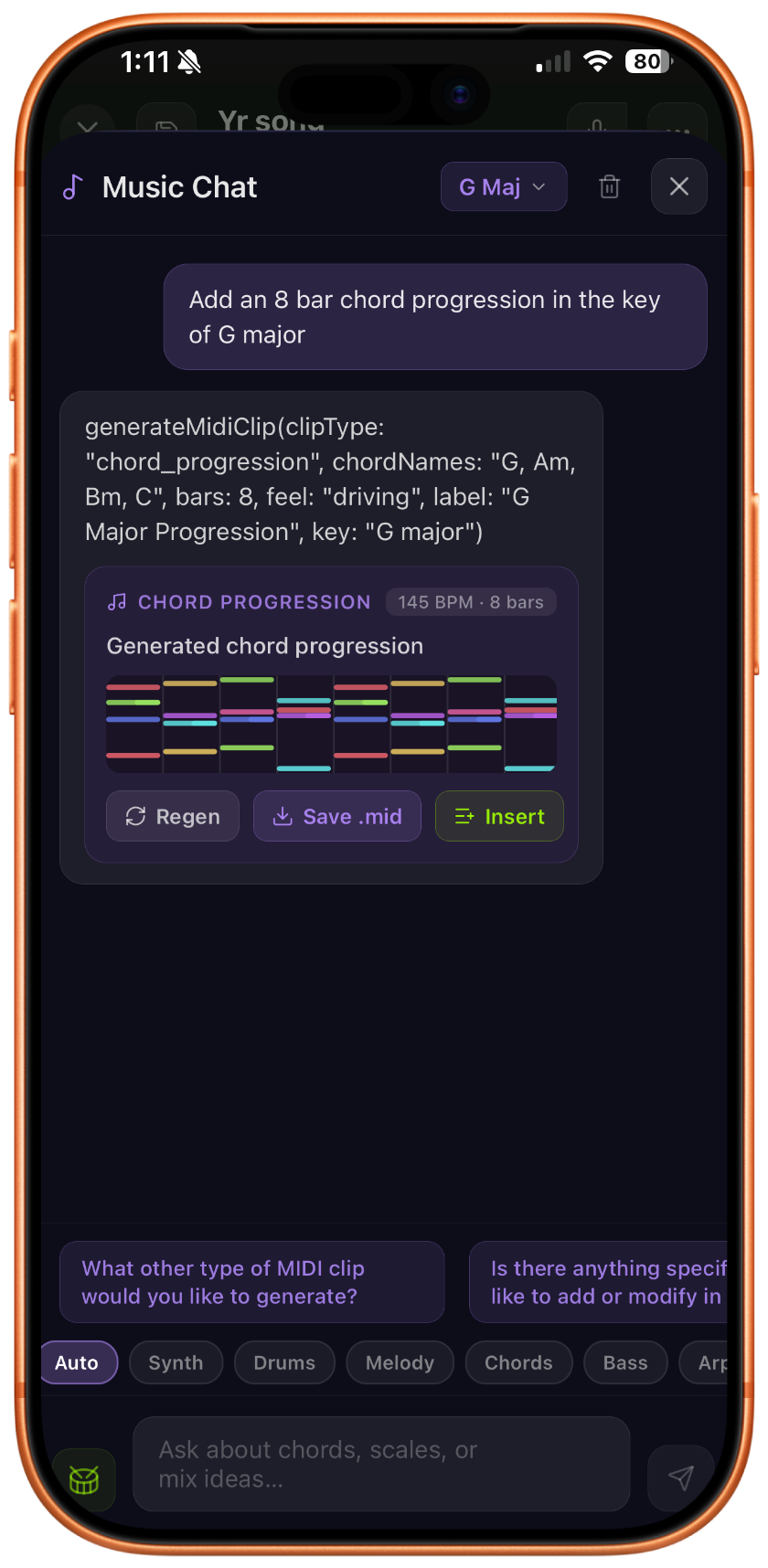
The recorder's theory assistant listens to what you've got, detects the key and the feel, and hands back a MIDI clip in context. Ask for a 16-bar bass in D dorian. Ask for a shuffle kit. Drop it on a track. No generative lofi, no vibe-filler. It's an instrument for your part.

  • Detects key, BPM, chord structure from the mix
  • MIDI clip generation: bass, chords, melody, drums
  • 16-pad drum machine with English → pattern
  • Copy/paste clips from the timeline straight into the drum sequencer
  • Pad sample editing panel: trim, tune, and shape your own hits
  • Preview inline, insert to any track, or export
Pro
Tuner · metronome · drum

Save tunings.
Ask for new ones.

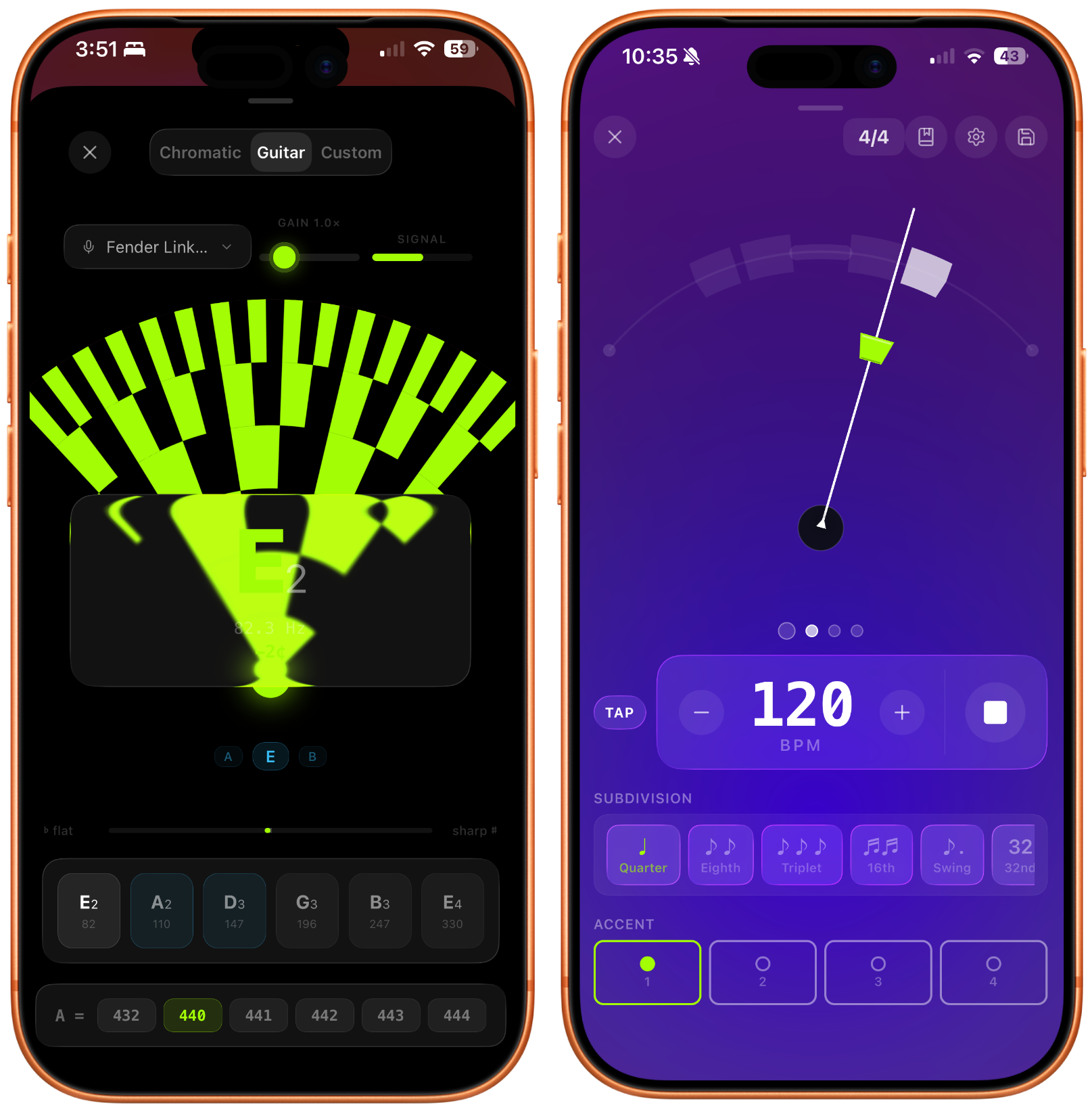
The tuner, the metronome and the drum machine are free. Saving your own tunings and kits is Pro.

Drop D to pedal steel E9: homecrate knows every tuning, and it'll generate custom ones with per-string Hz targets and gauge warnings when you invent your own. Metronome does subdivisions, swing, accent patterns. Drum machine turns "eight-bar halftime with open hats on the &-of-4" into a playable pattern.

  • Chromatic tuner, cents + needle, steady on low strings (free)
  • Preset tuning library, guitar to bass to pedal steel (free)
  • Intelligence based custom tunings with per-string Hz & gauge warnings (Pro)
  • Metronome: subdivisions, swing, accents, tap tempo (free)
  • 16-pad drum machine, English → step sequence (free, kit saving is Pro)
Free · Pro
Tuner · Metronome · Drum
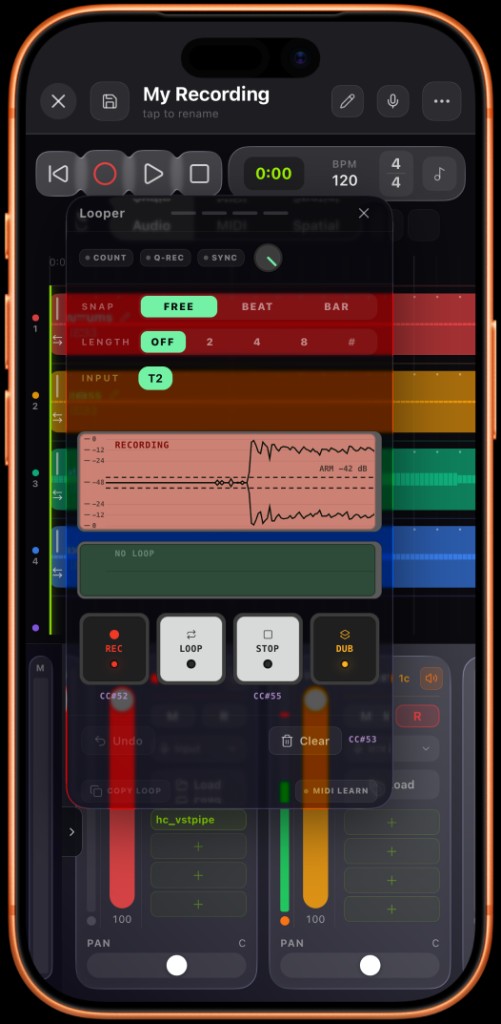
count me in. stack it live. Live looper: recording an overdub layer synced to the song, with rec, loop, stop, and dub controls
Live looper

A loop pedal
built in.

Set a length, hit record, and it waits for the bar to come around. Sound-on-sound overdubs. A footswitch away from hands-free.

The looper captures whatever's monitoring (guitar through the amp, a synth, a mic), locked to your song's tempo and bar count. Stack overdub layers, undo the last pass if it didn't land, and when something's worth keeping, copy it straight to the timeline as a regular, editable clip.

  • Synced to song transport: starts and re-anchors on the bar
  • Sound-on-sound overdubbing, undo per-layer
  • Copy the loop to the timeline as a rendered clip
  • MIDI-assignable: record, overdub, and undo from a footswitch
Pro
Collaborative sessions

The whole band.
One project.

Host on one device, join from the rest of the room. Every take lands where it belongs.

One device hosts the song and tempo; everyone else joins over Wi-Fi, hears the session, and plays along live. Turn on project sharing and tracks, clips, MIDI, and plugin setups sync both ways: a synth patch or amp rig arrives sounding like the host's. A follower that records contributes the take straight back to the host's timeline, clock-aligned. No streaming needed at all if you'd rather sync transport only.

  • Host + members over Wi-Fi, locked to shared transport & tempo
  • Two-way project sync: tracks, clips, MIDI, plugin settings
  • Followers' recordings land on the host's timeline automatically
  • Transport-only mode: sync tempo without streaming audio
Pro
same room. one clock. band recording, solved.
session · host: anthony's iphone 3 members
Mac · guitar + ampin sync
iPhone · vocalin sync
Vision Pro · drumssyncing…
shared project · takes land on the host timeline
03 also inside

The stuff you'll reach for anyway.

// midi i/o

Hardware MIDI.

Class-compliant USB-C or Bluetooth. External clock, Song Position, per-track routing. The recorder acts like a proper MIDI host.

· free, on every track
// editor

Piano roll. Step seq.

Full piano roll for melodic parts, step sequencer for drums, automation lanes for any AUv3 parameter, now with shape presets (linear, exponential, s-curve, swell) and MIDI clips that automate instrument parameters directly.

· free · velocity · quantize · automation
// clip editing

Stretch it. Slice it. Warp it.

Time-stretch clips pitch-preserving, honored everywhere from playback to spatial export. Slice at the playhead, crossfade clips into each other, pinch to zoom the timeline. Drag a marker onto a late snare to pull it back onto the grid without changing the clip's length. All fully undoable.

· free · audio & MIDI
// gesture control

Wave at it.

The front camera watches your hands and turns them into MIDI. Eleven poses, either hand, mapped to notes or to any parameter on that track. Grab and twist to ride a filter like a knob — no third hand required.

· pro only · arms with a countdown so nothing fires early
// share projects

Send the whole thing.

Export a project as a single file: tracks, clips, and plugin settings included. Import one a friend sends you and pick up where they left off.

· pro only · one file, everything in it
// analytics

Your stats. Just yours.

Play counts, skip rate, peak listening hours. Monthly personality summary, generated on-device. Stored locally, visible only to you.

· never leaves the phone
// plex sync

Your server. Your files.

Point homecrate at your Plex server, same player, same algorithm, same liner notes. Over Wi-Fi or offline.

· pro only · bring your own library
// karaoke

The whole sleeve, lit up.

Pro mode hands the lyric column a karaoke vibe, big type, word-by-word highlight, whole-album mode.

· pro only
// drum machine

Sixteen pads. Yours.

A pad sampler with a step sequencer built in. Tune, shape and level every pad on its own, paste a sample straight off the timeline, and bounce a pattern back out as a MIDI clip when you want to edit it by hand.

· free · saving your own kits is pro
// synth

Two oscillators. Any tuning.

A proper subtractive synth with unison, arpeggiator, envelopes and patches. It speaks MPE for expressive controllers, and it tunes to microtonal and world scales, not just twelve equal steps.

· free · saving your own patches is pro
// music games

A quiz from your own shelf.

Trivia and a timed Quick Fire round, with every question generated from the records you actually own. Nothing generic, nothing fetched. Achievements track milestones across your library and your listening.

· pro only
// on the home screen

Never opens, still useful.

Home screen widgets, lock screen and Control Center transport, CarPlay, and Bluetooth controls that behave. The player is on the shelf between sessions, not just during them.

· free
// identify

Fill in the blanks.

Got a file with no tags? Shazam it from inside the library, then pull down the artist, album, artwork and lyrics to match. Works one track at a time or across a whole import.

· on import or on demand
// sample crate

Samples from the desk.

Send a sample from your computer straight into the project you're working on. Strictly opt-in, and nothing lands on a track until you've seen its waveform and said yes.

· pro only · you approve every file
04 pricing

Buy ONCE.
No subscription.

Own the app. Own the algorithm. Own your data. One purchase, yours forever.

the player

free

// always free · no account · no ads
  • Local library player: FLAC, AAC, MP3, ALAC
  • Liner notes: artist bios, band members, discographies, track metadata
  • Lyric metadata for millions of songs, with line-synced highlighting (word-by-word karaoke is Pro)
  • Algorithm Tuner + Weather Mood: set it yourself, explicitly
  • Timestretch and warp markers, clip slicing, crossfades, automation lanes. It's a complete DAW by default.
  • 4-track recorder: 2 MIDI tracks, master bus, piano roll, hardware MIDI I/O
  • Seven AUv3 plugins with their factory presets, including the NAM amp's bundled profiles and the 16-pad drum machine (saving your own presets, custom profiles and IRs are Pro)
  • On-device analytics
// free forever · no account required
the studio

pro

// $9.99 · once · yours forever
  • Everything in free
  • Library Intelligence: ask your collection anything, grounded in your data
  • Karaoke mode: synced lyrics, word-by-word
  • Plex sync: your server, your files
  • homecrate Studio: up to 16 audio and 8 MIDI tracks, voice control
  • On-device stem separation & audio-to-MIDI: unlimited, offline
  • Live looper with MIDI-assignable actions and sound-on-sound overdubs
  • AI mood playlists, built on-device from real audio analysis
  • Save your own presets, kits and patches, plus custom NAM profiles and IRs
  • 2 Pro-only AUv3s: gesture (hands to MIDI) and vstpipe (real VST3/AU hosting)
  • Spatial audio: per-track 3D positioning, 3D view, APAC + video export
  • Multi-device band recording, collaborative sessions, Companion App sample sync
  • Music theory Intelligence + drum machine: on-device MIDI generation
  • Video recording with camera FX, third-party AUv3 hosting, music games
// iOS · iPadOS · macOS · visionOS · one purchase · no subscription · ever
06 questions

The actual questions.

Everything people ask before buying. No, there is no subscription.

What is homecrate?

homecrate is a free iOS app that plays your local music library (FLAC, AAC, MP3, and ALAC files) with on-device intelligence for playlist generation, liner notes, and listening analytics. It also includes a mobile recording studio: 4 tracks free, up to 16 with Pro ($9.99 once), plus voice control, neural amp modeling, and spatial audio. No subscription, no account, no cloud.

Is homecrate free?

Yes. homecrate is free to download and use as a local library player. The free tier includes the full player, Algorithm Tuner, liner notes, on-device analytics, and a 4-track recorder with a master bus, piano roll, MIDI I/O and the factory AUv3 plugins. The Pro unlock is a one-time $9.99 purchase that adds tracks 5 to 16, library chat, voice control, stem separation, custom amp profiles, spatial audio, band sessions, and more.

Does homecrate require a subscription?

No. homecrate has no subscription, ever. The Pro features are unlocked with a single $9.99 one-time purchase. The free tier is free permanently.

Does homecrate send data to the cloud?

No. All intelligence features in homecrate (library chat, playlist generation, analytics summaries, music theory) run entirely on-device using Apple's on-device Intelligence frameworks. Your listening data never leaves your phone.

What audio formats does homecrate support?

homecrate supports FLAC, AAC, MP3, and ALAC (Apple Lossless) files stored locally on your iPhone.

What is the homecrate Algorithm Tuner?

The Algorithm Tuner is a transparent listening algorithm with real sliders you control: discovery rate, energy, mood weighting, and a no-repeat window. Unlike streaming service black-box algorithms, you can see and change every rule. It also includes a daily Weather Mood game that uses current weather to lightly steer what plays next.

What is homecrate Pro?

homecrate Pro is a one-time $9.99 unlock. The recorder grows from 4 audio and 2 MIDI tracks to 16 and 8, and Pro adds voice control (say 'arm track 2' or 'give me a bassline in D minor'), unlimited on-device stem separation, audio-to-MIDI, a live looper, custom NAM profiles and IRs, saving your own presets, real VST3/AU plugin hosting via hc_vstpipe, gesture control, spatial audio with per-track positioning and APAC export, multi-device band recording, music theory intelligence, library chat, word-by-word karaoke, video recording, music games, and Plex server sync. The master bus, piano roll, MIDI I/O, clip editing and the factory plugins are free.

Does homecrate separate songs into stems?

Yes, with Pro. homecrate splits any song into stems (vocals, drums, bass, guitar, and more) entirely on-device, with no upload and no monthly limit. Choose the GPU engine for speed on modern iPhones or the CPU engine for broader compatibility, and pick a 4-stem or 6-stem (dedicated guitar) model. Stems land already aligned on the timeline, ready to mute, solo, or play along with through the homecrate amp.

Can homecrate host VST3 or Audio Unit plugins?

Yes, with Pro, via hc_vstpipe. It's an AUv3 that streams audio, MIDI, and transport to a free companion Mac app, which hosts your real VST3 or Audio Unit plugin and streams the processed sound back at low latency. Plugin parameters appear as automatable targets in the clip editor just like a native homecrate plugin.

Can multiple people record together on different devices?

Yes, with Pro. Collaborative Sessions link devices on the same Wi-Fi network so a whole room can play and record together: one device hosts the project and tempo, everyone else joins, and takes recorded on any device land on the host's timeline automatically. You can also sync transport only, without streaming audio, if each musician has their own monitoring setup.

Does homecrate work with Plex?

Yes, with Pro. You can point homecrate at your Plex server and use the same player, algorithm, and liner notes with your server library, over Wi-Fi or cached offline.
More detail in the documentation, or read what's new in the release notes.

your music. your algorithm. your crate.

Built by a musician, for the people who still buy the record.

still buying & making records?

Good. This was built for you.

// no account · your library stays on your device