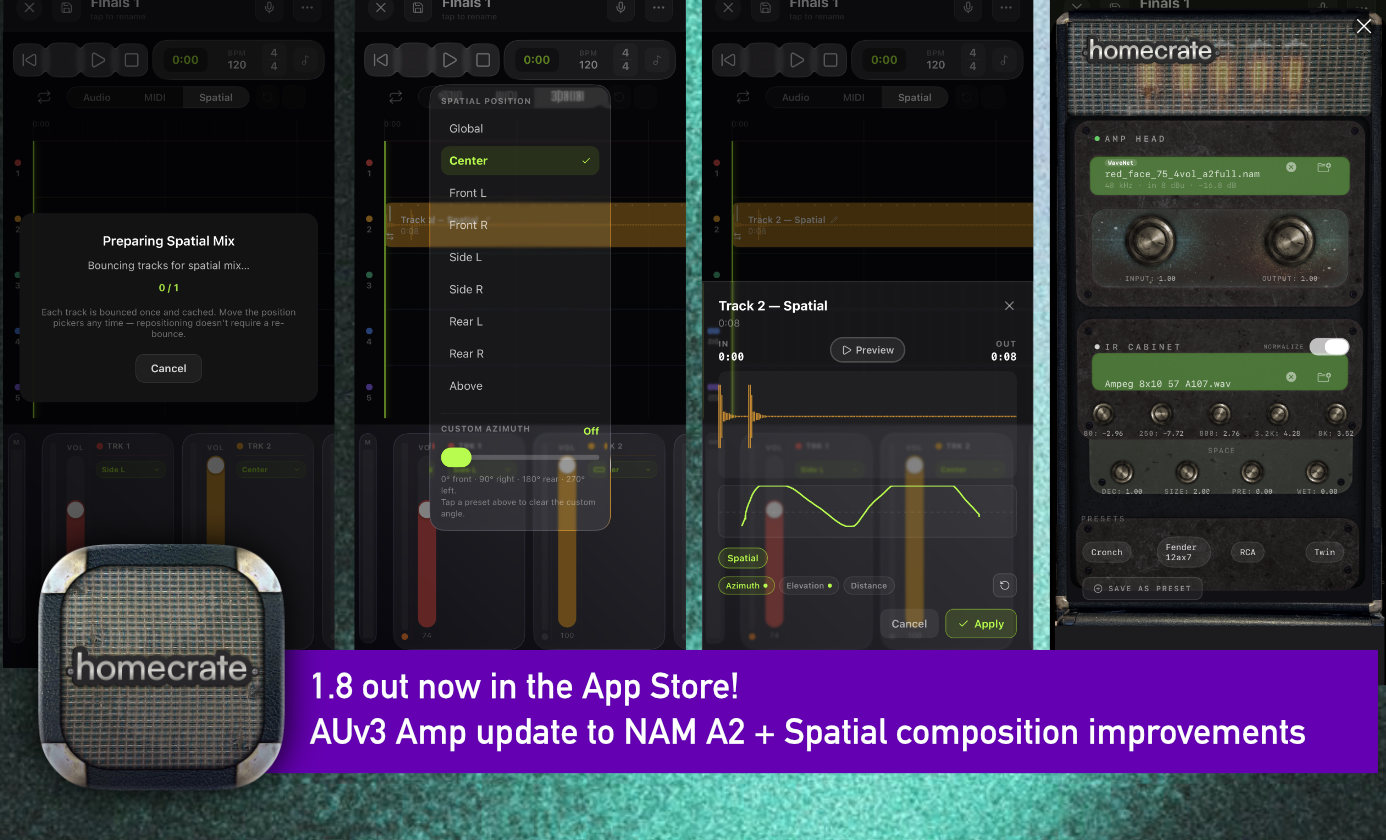
homecrate 1.8 is available now on iOS. Two things headline this one: a spatial recording mode you can actually mix in real time, and a full move to the new Neural Amp Modeler A2 architecture for the amp. There’s also a round of recorder stability work and a few player fixes. Here’s what’s new.
Spatial recording, mixed in three dimensions
This is the feature I’m most excited about. You can now bounce any project into spatial mode and place each track anywhere in the soundfield around the listener. Not just left and right, but depth and height too. Drums behind you, a vocal up front, a pad floating overhead.
It’s built to be composable. Clips are cached when you bounce, so you can switch between spatial and the normal mix without waiting on a re-render every time. Change a plugin or a clip parameter and the cache for that track invalidates and rebounces on its own, so what you hear always matches what you’ve set.
A few specifics:
- Live preview that coexists with playback. The recorder runs its own audio engine now, so spatial preview and normal playback no longer fight over the session. You can audition positions while the project plays.
- Position automation in the clip editor. Draw a track’s spatial position right on the timeline so a sound can move through the mix over time.
- Correct spatial export. MIDI tracks are mixed down properly in the spatial render, and rendering on AirPods Pro and Max is improved (the waves icon in Control Center). Startup cutouts with AirPods and Bluetooth are fixed too.
The amp moves to NAM A2
The built-in amp now runs Neural Amp Modeler A2, the new generation of the open NAM standard. Same workflow and the same tones you already saved, with real gains across the board:
- More accurate. A2 roughly halves the average model error, so the digital amp sits closer to the analog original, note for note.
- 30 to 40% more efficient. Leaner processing leaves more headroom to run the full chain (amp into cab IR into EQ into reverb) without compromise.
- Cleaner highs. The digital fizz and metallic ring that could creep into high-gain tones is reduced.
- Better feel. A2 hears about 50% more of your playing before it responds, so sag, compression, and pick dynamics come through more naturally.
- Five updated A2 factory presets: Red Face 75, Soy Milk 12AT7 RCA, and three Soy Milk 12AX7 variants.
Your saved tones still load unchanged. The new presets restore automatically on launch.
Download the A2 profiles
Quick correction: I shipped the wrong A2-ready files in the build, so the factory presets in your library may not be the final versions. The correct profiles are hosted here. Download the ones you want, then load them in the amp’s plugin view the same way you’d load any other profile (the folder icon on the amp head):
- Red Face 75 (4 vol)
- Soy Milk 12AT7 RCA (8 vol)
- Soy Milk 12AX7 (4 vol)
- Soy Milk 12AX7 (8 vol)
- Soy Milk 12AX7 Fender (8 vol)
Save the file to your device, open the amp, tap the load icon on the amp head, and pick the profile.
Recorder: a more stable playground
- Stability fixes for plugging and unplugging audio interfaces. Spatial preview and playback now coexist cleanly.
- Monitoring is an independent control. Use the speaker icon next to a track name to drop into hearing your signal.
- New “always count in” setting for recording. The count-in is skipped if playback is already in progress.
Player
- CarPlay now matches the in-app Library. Merged artists are respected, so a merged parent shows the combined catalog from all its children.
- New Artist Edit panel. Edit artist details by hand and they’re respected if you ever refresh your data.
Thanks
NAM is an open standard built by Steve Atkinson, with the A2 work done alongside TONE3000. homecrate speaks it natively, and none of this amp work happens without that project. If you want to go deeper:
Update homecrate, bounce a project into spatial, and plug in. Go play.