homecrate grain — Granular Reverb / Delay
homecrate grain is a granular texture machine in a single AUv3 effect plugin. It listens to whatever you play through it, keeps the last eight seconds in a rolling capture buffer, and continuously re-plays tiny slices of that buffer — grains — as a cloud behind your instrument. You can let the buffer roll (LIVE), grab a moment and loop it (CATCH), FREEZE everything into an infinite hold, or pin an audio file as the grain source. Around the granular core sit a routable stereo delay, a modulated reverb, a keybed-quantized six-band resonator, a lo-fi WASH degrade stage, and a GLUE bus — all pre-wired so shoegaze beds, ambient swells, and broken-radio textures come out of one plugin.
The design goal is playability: your dry signal passes through untouched while the texture blooms behind it, so you can keep performing over the cloud you just made.
🟢 New to granular effects? Skip to Quick Start. At default settings the plugin is a clean passthrough — every effect level starts at zero, so nothing happens until you raise a knob. Raise MIX on the GRAIN tab and you will hear it immediately.
🔵 Coming from a granular pedal or Eurorack? The buffer is always listening — there is no record-arm. CATCH latches the last N seconds as a micro-loop, FREEZE halts the buffer where it is, SCAN sets how the frozen playhead moves (0 = still-point drone, negative = reverse), and CLOCK is a coupled repitch-and-degrade divider. The chassis keybed is global: it quantizes grain pitches, tunes the resonator, and snaps MIDI input into key.
Quick Start
- Load homecrate grain as an AUv3 effect on any track — it appears in the Plugin Browser as homecrate: hc_grain under Effects
- Play something. The LCD at the top shows the waveform rolling through the capture buffer
- On the GRAIN tab, raise MIX to about 0.5 — a cloud of grains fades in behind your playing
- Turn SIZE and DENSITY to taste: big sparse grains smear, small dense grains shimmer
- Open the SPACE tab and raise WET to about 0.4 to put the cloud in a hall
- Now hold a chord and tap FREEZE in the header. The buffer stops — the chord hangs forever while you play over it. Tap FREEZE again to release
- Or try a preset: PRESETS → Shoegaze → Washed Out is the sound of the plugin in one tap
That’s the core loop: play, capture, freeze, play over it. Everything else is refinement.
Loading homecrate grain in Homecrate
See Loading & Removing Plugins for the general steps. homecrate grain appears under the Effects tab of the Plugin Browser as homecrate: hc_grain. A second entry, homecrate: hc_grain (MIDI), is the same plugin registered as a MIDI-capable effect — load that one when you want to drive it from a MIDI track (see MIDI — playing the buffer).
It is one of homecrate’s own plugins, so it is already installed — nothing to buy, download, or authorize, and it is not behind the Pro plugin gate that applies to third-party AUv3s. (Some features inside the editor are Pro — see Pro vs Free.)
Where to put it: anywhere you want texture. On a guitar or synth track it goes after drive/amp plugins so the grains capture the finished tone. It is equally at home on a vocal, a piano, or a whole drum bus. The plugin adds no latency.
At default settings it is a clean passthrough — inserting it changes nothing until you raise an effect level. That also means an old project that loads the plugin fresh sounds exactly as it did.
The Interface
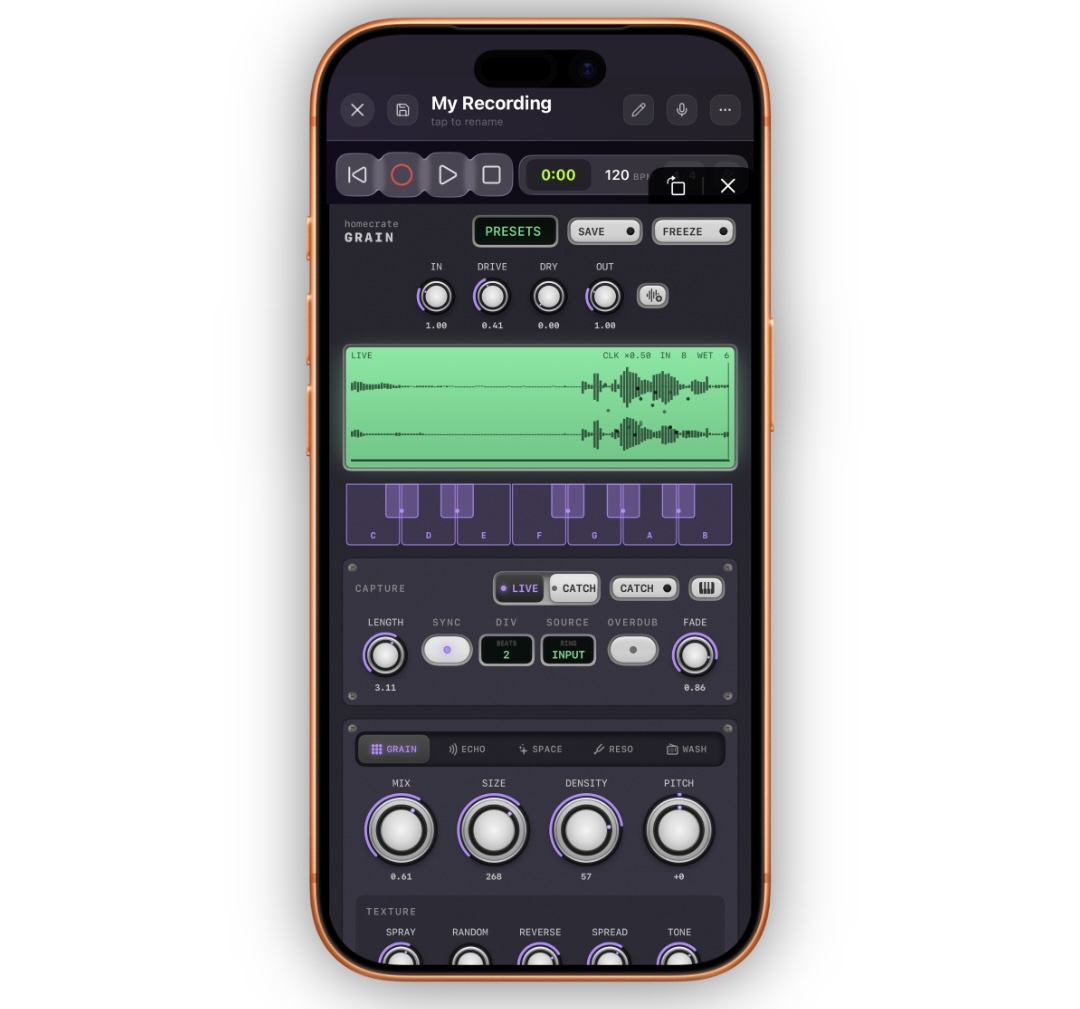
The faceplate scrolls vertically. Top to bottom:
| Area | What lives there |
|---|---|
| Header | homecrate GRAIN branding, the PRESETS menu, SAVE, and the FREEZE latch |
| Master strip | IN, DRIVE, DRY, OUT knobs, plus the loop-file LOAD / RELOAD / EJECT buttons |
| LCD | The live scope: buffer waveform, grain activity, playheads, and status badges |
| Keybed | The GLOBAL KEY — twelve toggleable pitch classes that tune the whole plugin |
| CAPTURE | LIVE/CATCH mode, the CATCH pad, loop length/sync, OVERDUB, FADE, SOURCE |
| FX tabs | Five pages: GRAIN, ECHO, SPACE, RESO, WASH |
The five tabs are pages of the same plugin — switching tabs never changes your sound, only what you are looking at. All five stay loaded and processing at all times.
Every knob double-taps back to its default. If you have chased yourself into a corner, double-tap.
If Homecrate Pro is not active, a Pro banner sits above the header. The plugin still works — see Pro vs Free for exactly what is gated.
The LCD
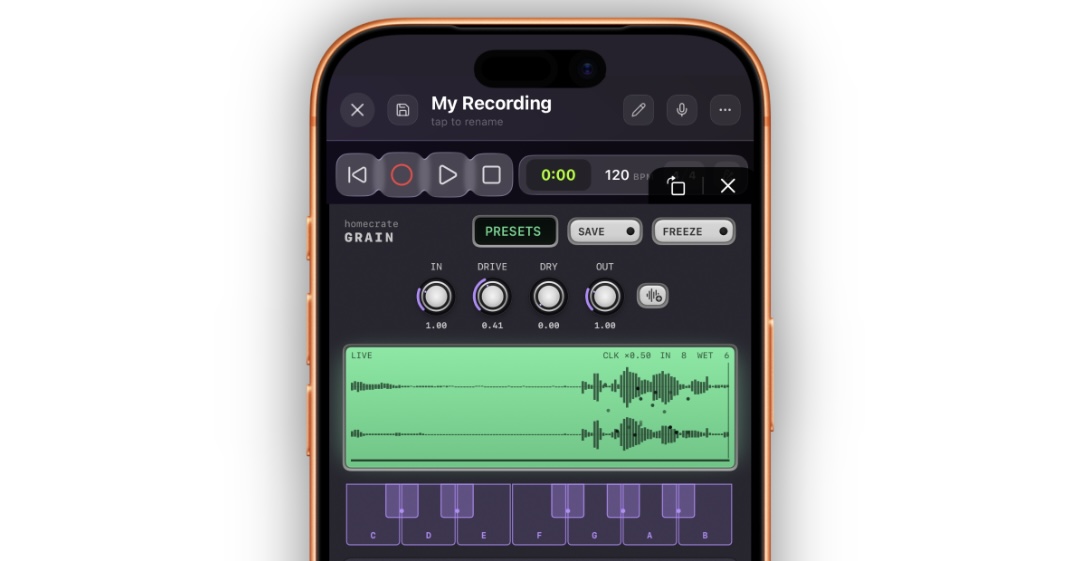
The scope at the top is a live view into the capture buffer, updating in real time while the editor is open:
- Waveform — the mirrored envelope of the last eight seconds of audio. In LIVE mode it rolls continuously, newest audio at the right edge.
- Grain dots — every sounding grain is a dot: horizontal position = where in the buffer it is reading, vertical position = its stereo pan, brightness = its loudness, and color shifts with its pitch offset. A dense shimmer patch looks like a snowstorm; a sparse reverse patch looks like fireflies drifting left.
- Head lines — the write head (where new audio is landing) and, when frozen or latched, the play head scanning the held region.
- Loop region — in CATCH mode the latched region is highlighted and the rest of the buffer dims.
- Badges — the current capture state, top corner:
| Badge | Meaning |
|---|---|
| LIVE | The buffer is rolling; grains read from just behind now |
| ARMED | CATCH mode is selected but no moment has been latched yet |
| LATCHED | A micro-loop is caught and playing |
| FREEZE | The buffer is halted — an infinite hold |
| OVERDUB | New audio is being layered into the caught loop |
The LCD is a diagnostic as much as decoration: if you hear nothing, look at it. No waveform = nothing is reaching the capture buffer (check IN and your track’s input). Waveform but no dots = MIX is down or DENSITY is very low.
The Keybed — GLOBAL KEY
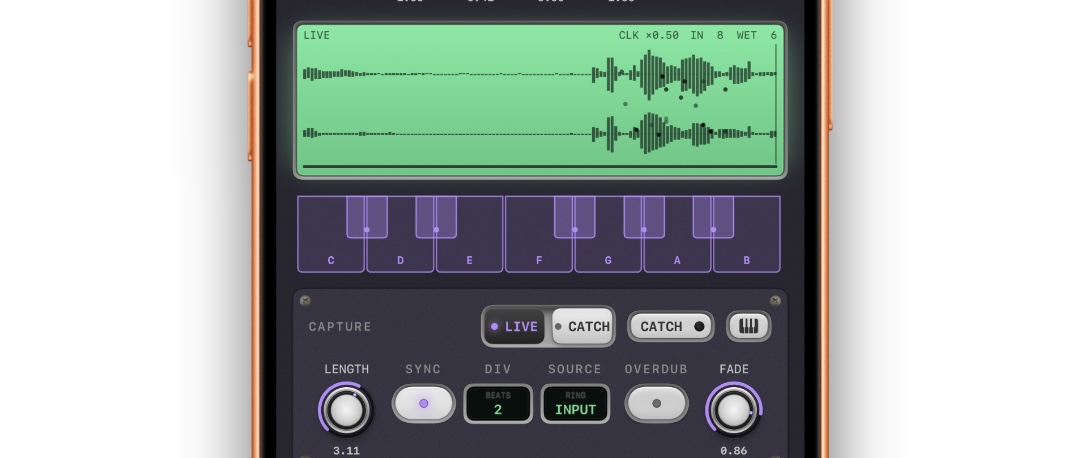
The twelve keys under the LCD are the plugin’s global key. Tap keys to toggle them. Enabled keys (lit) are the pitches the plugin is allowed to use, in three places at once:
- Grain pitch quantize — with QUANT on (GRAIN tab), every grain’s pitch offset snaps so the cloud lands in key
- The resonator — the six RESO bands only tune to enabled pitch classes
- MIDI input — notes you play in the MIDI modes are snapped up into the key
Default is C major. Set it to your song’s key once and every pitched feature of the plugin agrees with the track. At least one key always stays enabled.
CAPTURE — the buffer and the micro-looper
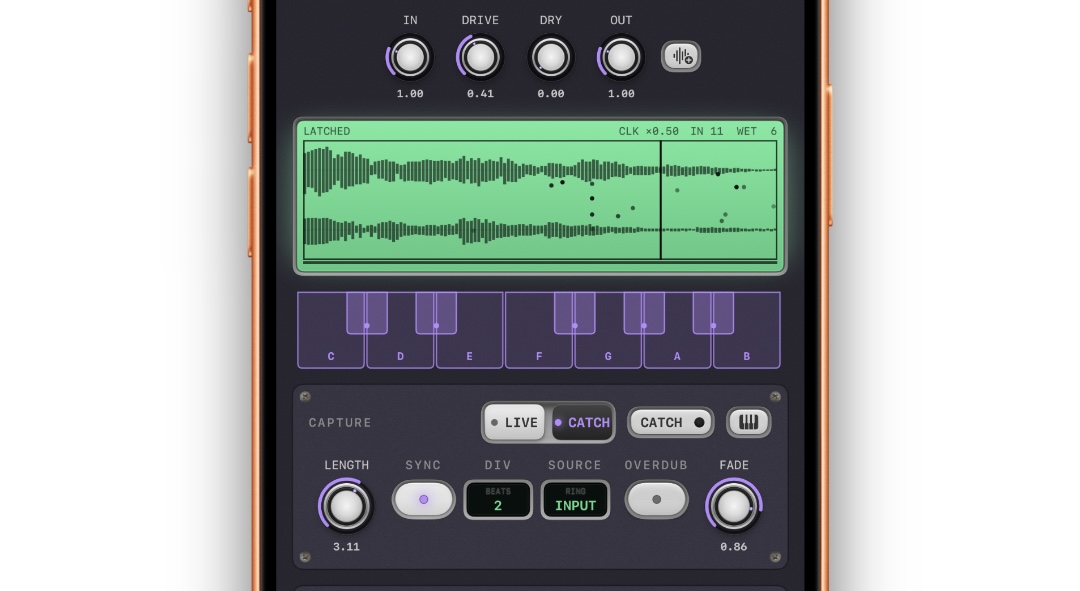
| Control | Range | Default | What it does |
|---|---|---|---|
| LIVE / CATCH | rocker | LIVE | The two capture models — see below |
| CATCH | momentary pad | — | In CATCH mode: latch the last LENGTH seconds as a loop. Tap again to release |
| KEYS | button | — | Opens the on-screen keyboard for the MIDI modes |
| LENGTH | 0.25–5 s | 2 s | How much audio a catch grabs, when SYNC is off |
| SYNC | on / off | off | Beat-quantize the catch length to the project tempo |
| DIV | 1/2, 1, 2, 4, 8 beats | 2 | The catch length when SYNC is on |
| SOURCE | INPUT / IN+FX / FX | INPUT | What the buffer hears — see below |
| OVERDUB 🔒 | on / off | off | Layer new playing into the caught loop (Pro) |
| FADE | 0.0–1.0 | 0.00 | How fast overdubbed layers decay each pass |
| FREEZE | latch (in the header) | off | Halt the buffer wherever it is |
LIVE mode
The buffer rolls continuously and grains read from just behind “now.” This is the ambient-pad, shimmer-behind-the-instrument model: the cloud always reflects what you played a moment ago. FREEZE at any time turns the trailing eight seconds into an infinite hold.
CATCH mode — the micro-looper
Tap CATCH and the plugin latches the audio you already played — the last LENGTH seconds — as a loop. There is no record-arm and no waiting: the buffer was already listening, so the moment you liked is already in there. The badge flips to LATCHED, the LCD highlights the region, and the grains now read from the caught loop.
- SCAN (GRAIN tab) sets how the latched playhead moves: 1 = natural replay, 0 = a frozen still-point drone, negative = reverse.
- SYNC + DIV make the catch length musical — catch exactly 2 beats and the loop locks to your groove.
- Tap CATCH again to release back to the rolling buffer.
OVERDUB and FADE — the moment stack 🔒
With OVERDUB on (Pro), playing while a loop is latched layers your new audio into the loop. FADE controls what happens to old layers each pass: at 0 they stack forever; raised, each pass decays — which turns the looper into a long, evolving delay. Building a bed layer by layer and letting it slowly dissolve is one of the signature sounds of the plugin.
RELOAD (master strip) restores the loop to its pristine state — the catch as it was before any overdubs.
SOURCE — what the buffer hears
| Setting | The buffer captures |
|---|---|
| INPUT (default) | Your dry playing only — the cloud stays a reflection of the instrument |
| IN+FX | Playing plus the plugin’s own effects — the texture starts feeding on itself |
| FX | Only the effects — the input merely excites a self-sustaining system |
FX is the drone machine: with delay routed back and grain feedback up, the plugin becomes an instrument of its own that your playing only stirs.
FREEZE
FREEZE (header latch) halts the capture buffer wherever it is — in either mode. What is held, holds forever; what the delay and reverb were doing keeps running and decays naturally over the hold. Freeze is also available from MIDI (CC 25 by default) so a foot controller can hold a pad hands-free.
The Master Strip and Loop Files
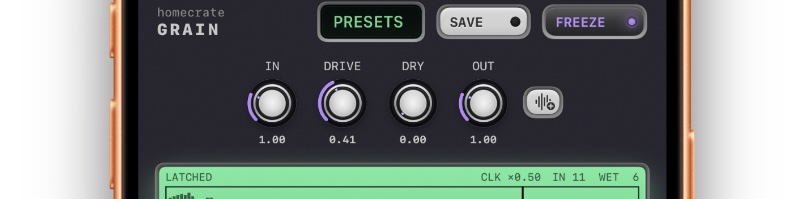
| Control | Range | Default | What it does |
|---|---|---|---|
| IN | 0.0–4.0× | 1.00 | Level into the plugin (and into the capture buffer) |
| DRIVE | 0.0–1.0 | 0.00 | Saturation on the input, before the capture tap — grains inherit the grit |
| DRY | 0.0–1.0 | 1.00 | Your dry signal’s level at the final output |
| OUT | 0.0–4.0× | 1.00 | Final level after everything |
DRY is the wash-out fader. It only touches the dry signal at the very end — the capture buffer and every effect stay fully fed. Pull it to 0 and the plugin outputs pure texture: the instrument disappears and only the cloud remains. Ride it with an expression pedal (CC 115) to melt in and out of the wash mid-song.
Loop files
The three small buttons beside OUT manage file-backed loops:
- LOAD opens the file picker and pins an audio file as the grain source — the file becomes the frozen buffer, and the grains granulate it instead of your live input. Load a vocal phrase, a field recording, a drone — anything.
- RELOAD restores the pristine file over anything overdubs have done to it.
- EJECT releases the file and returns to normal capture.
While a file is pinned the FREEZE latch locks (the file is the frozen source — eject is the way out). Imported files are copied into the shared HomecrateSamples/GrainLoops library.
Caught moments are saved with your project. If you save a project while a loop is latched, the captured audio is written out automatically and restored — latched, frozen state and all — when the project reopens.
GRAIN — the granular voice
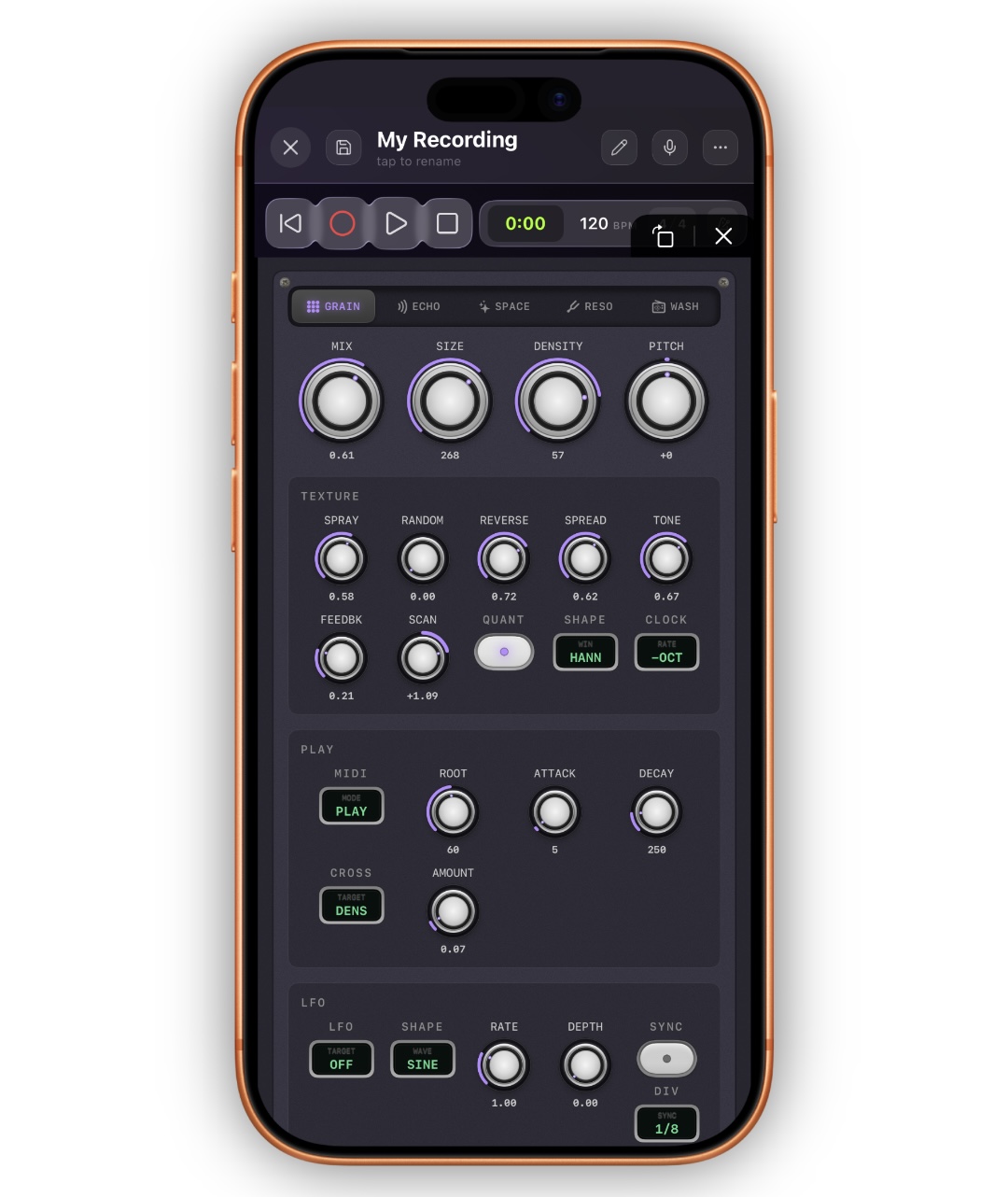
The main tab. Four oversized knobs are the voice; the captioned groups below refine it.
| Knob | Range | Default | What it does |
|---|---|---|---|
| MIX | 0.0–1.0 | 0.00 | Grain cloud level. The master gate for the whole granular section |
| SIZE | 20–500 ms | 120 ms | Length of each grain. Short = grit and shimmer, long = smearing pads |
| DENSITY | 2–80 /s | 18 /s | How many grains spawn per second |
| PITCH | ±24 st | 0 | Pitch offset applied to every grain |
TEXTURE
| Control | Range | Default | What it does |
|---|---|---|---|
| SPRAY | 0.0–1.0 | 0.25 | How far back into the buffer grains scatter. 0 = tight echo of “now”, 1 = anywhere in eight seconds |
| RANDOM | 0.0–1.0 | 0.00 | Random per-grain pitch variation |
| REVERSE | 0.0–1.0 | 0.00 | Probability that a grain plays backwards |
| SPREAD | 0.0–1.0 | 0.60 | Stereo width of the cloud |
| TONE | 0.0–1.0 | 0.50 | Cloud tone: left of center darkens, right of center thins. Applied before the sends, so echoes and reverb inherit it |
| FEEDBK | 0.0–0.9 | 0.00 | Grain output fed back into the capture buffer — clouds that re-granulate themselves |
| SCAN | −2.0–+2.0 | 1.00 | Playhead speed through frozen/latched audio: 0 = still-point, negative = reverse |
| QUANT | on / off | off | Snap grain pitches to musical intervals, filtered through the global keybed |
| SHAPE | Hann / Tri / Decay / Swell | Hann | The grain envelope: smooth, pointed, plucky attack, or reversed swell |
| CLOCK | FULL / −5TH / −OCT / −2OCT | FULL | Drops the whole engine’s playback rate — everything repitches down and degrades as it slows. The lo-fi sludge control |
PITCH + QUANT is the shimmer machine. PITCH +12 with QUANT on gives the classic octave-shimmer cloud; add RANDOM ~0.4 and the quantizer scatters grains across musical intervals instead of one fixed shift.
FEEDBK deserves respect. Above ~0.5 with SPRAY up, the cloud starts feeding on itself and drifts toward self-sustaining drone. It is bounded — it saturates musically rather than blowing up — but it will happily run away from you slowly.
PLAY — MIDI response and touch dynamics
| Control | Range | Default | What it does |
|---|---|---|---|
| MIDI MODE | OFF / PLAY / ROOT | OFF | See MIDI — playing the buffer |
| ROOT | 0–127 | 60 (C4) | The reference note MIDI pitches are measured against |
| ATTACK | 1–2000 ms | 5 ms | Per-note fade-in in PLAY mode |
| DECAY | 5–5000 ms | 250 ms | Per-note ring-out in PLAY mode — released notes keep sounding grains as they fade |
| CROSS TARGET | OFF / DENS / PITCH / SIZE / SPRAY | OFF | Which grain parameter follows your playing dynamics |
| CROSS AMOUNT | 0.0–1.0 | 0.50 | How strongly it follows |
CROSS ties the cloud to how hard you play: an envelope follower on your input pushes the chosen parameter. CROSS → DENSITY means digging in scatters a denser swarm; CROSS → PITCH makes accents bloom upward. It is applied per-grain at spawn time, so it never zippers.
LFO
A dedicated grain LFO, applied to each grain as it spawns (so moving targets never glitch grains already sounding):
| Control | Options |
|---|---|
| TARGET | OFF / SIZE / DENS / SPRAY / PITCH / SPREAD / SCAN / TONE |
| WAVE | SINE / TRI / SAW+ / SAW− / SQR / S&H |
| RATE | 0.05–8 Hz, or tempo-synced (SYNC + DIV, 1/4 through 1/8T) |
| DEPTH | 0.0–1.0 — the on/off gate; 0 = LFO off |
LFO → SCAN on a frozen buffer slowly sweeps the playhead back and forth through the held moment — one of the best set-and-forget ambient movements in the plugin. LFO → PITCH lands before the quantizer, so with QUANT on a pitch LFO steps through intervals in key instead of sliding.
ECHO — the delay
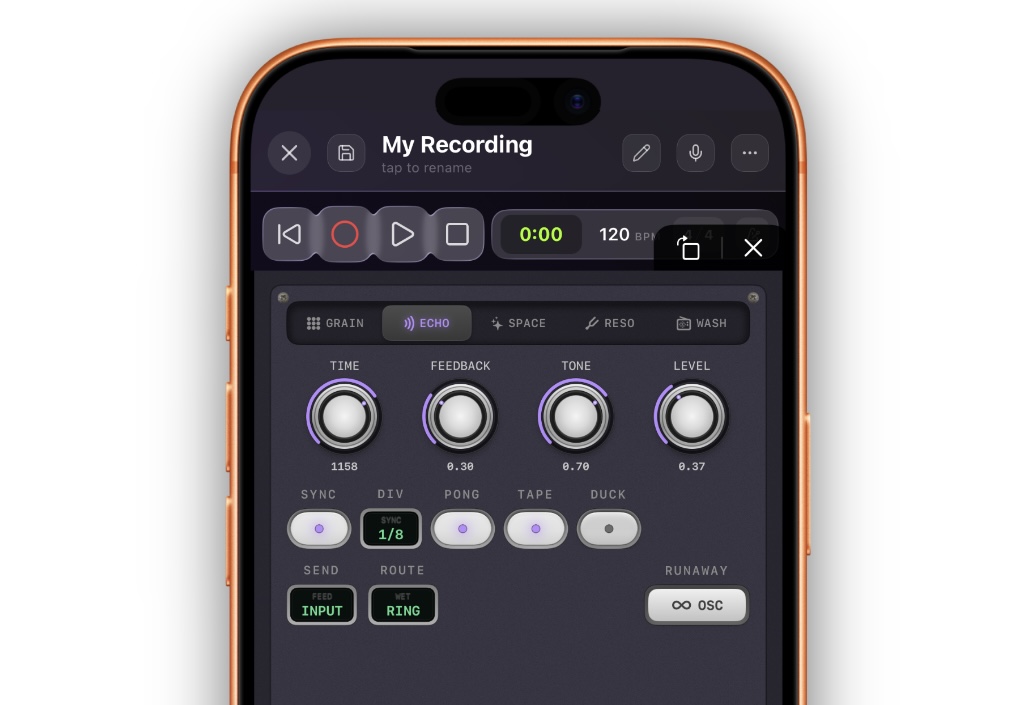
The same stereo delay voice as homecrate vocal and homecrate amp — but here it is wired as a send/return with routing, which makes it a texture tool rather than just an echo.
| Control | Range | Default | What it does |
|---|---|---|---|
| TIME | 20–2000 ms | 350 ms | Delay time when SYNC is off |
| FEEDBACK | 0.0–1.0 | 0.35 | Repeats |
| TONE | 0.0–1.0 | 0.70 | Damping inside the loop — repeats get progressively darker |
| LEVEL | 0.0–1.0 | 0.00 | Wet return level. The gate for the whole delay section |
| SYNC / DIV | 1/4 … 1/8T | off / 1/8 | Tempo-sync |
| PONG | on / off | off | Repeats alternate left/right |
| TAPE | on / off | off | Wobble + pitch-bending time changes |
| DUCK | on / off | off | Repeats pull back while you play, bloom in the gaps |
| SEND | INPUT / GRAINS / IN+GRN | INPUT | What feeds the delay line |
| ROUTE | OUT / VERB / RING / WASH | OUT | Where the wet return goes |
| RUNAWAY | momentary | — | Hold to push feedback into saturated self-oscillation |
SEND decides what echoes: your dry playing, the grain cloud, or both. Grains are sent at full strength even if MIX is at zero — so you can build a delay-only granular texture where the cloud is heard exclusively through its echoes.
ROUTE is where it gets interesting:
| Route | What happens |
|---|---|
| OUT | Clean echoes over the texture — the normal delay |
| VERB | Echoes bloom only inside the reverb tail — nothing repeats dry. Lush and distant |
| RING | Echoes are fed back into the capture buffer — they re-emerge as grains. The regeneration loop: swells that feed themselves |
| WASH | Echoes join the wet bed before the WASH stage, so they share its degradation |
RUNAWAY is a performance control: hold it and the feedback climbs past unity into a howling, saturated bloom; release and it decays naturally. It responds to MIDI CC 27 by default, and it is a prime candidate for an automation lane.
SPACE — the reverb
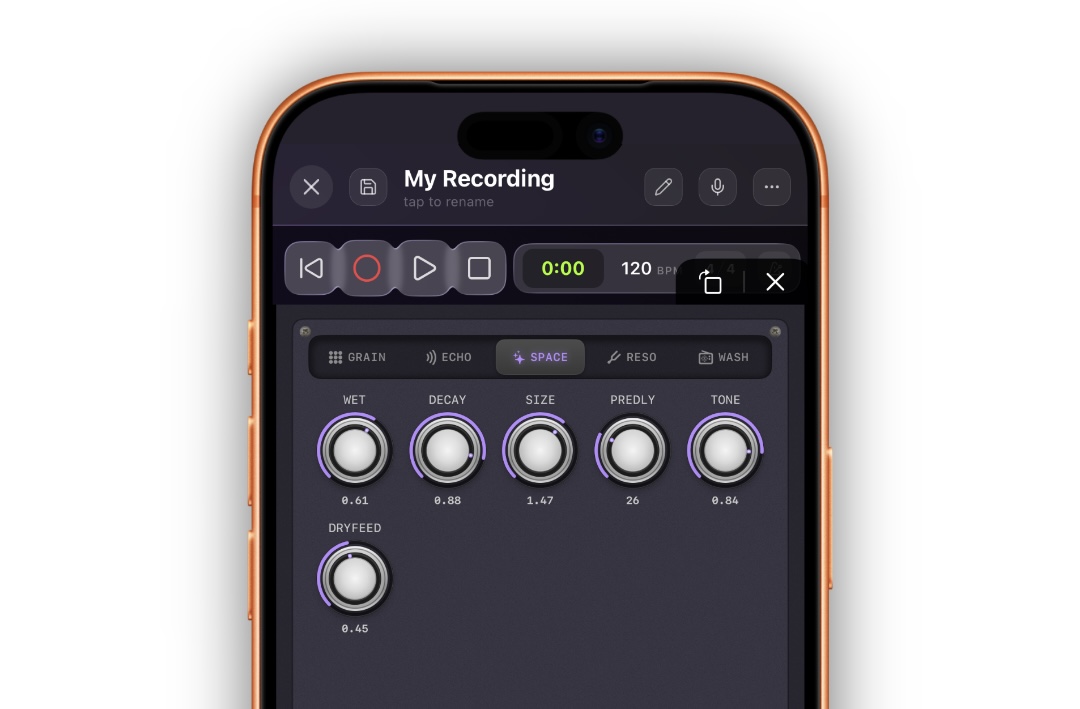
A modulated, plate-style reverb — the tail never sits perfectly still, which keeps long decays smooth instead of metallic.
| Knob | Range | Default | What it does |
|---|---|---|---|
| WET | 0.0–1.0 | 0.00 | Reverb return level. The gate for the section |
| DECAY | 0.0–1.0 | 0.50 | Tail length, room to endless wash |
| SIZE | 0.5–2.0 | 1.00 | The size of the space |
| PREDLY | 0–100 ms | 10 ms | Gap before the reverb starts |
| TONE | 0.0–1.0 | 0.70 | Tail brightness |
| DRYFEED | 0.0–1.0 | 0.00 | Sends your dry signal into the reverb |
By default the reverb hears only the wet bed — grains and routed echoes — so the space belongs to the texture while your instrument stays dry and present. DRYFEED changes that: raise it and the reverb becomes a normal send reverb for your playing too. With everything else at zero, DRYFEED + WET is simply a nice reverb pedal.
RESO — the quantized resonator
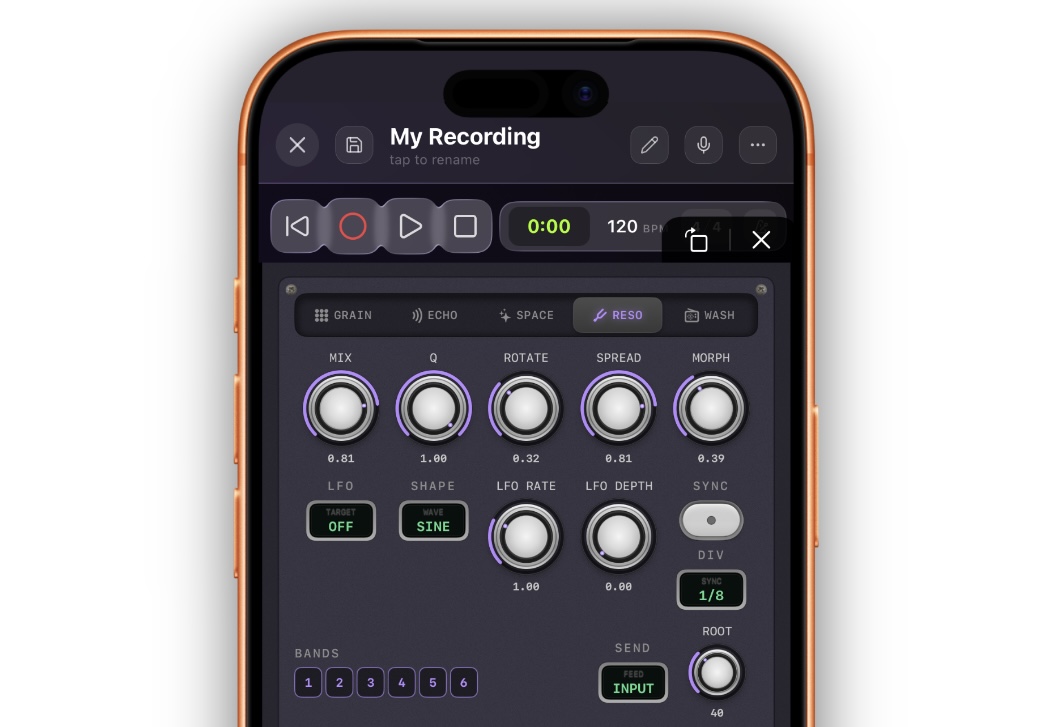
Six resonant bands that ring sympathetically with whatever passes through them — like a set of tuned strings humming along. The twist: the bands only tune to pitches enabled on the global keybed, so the ringing is always in key.
| Control | Range | Default | What it does |
|---|---|---|---|
| MIX | 0.0–1.0 | 0.00 | Resonator return level. The gate for the section |
| Q | 0.0–1.0 | 0.50 | How sharply the bands ring — high Q is long, pitched sustain |
| ROTATE | 0.0–1.0 | 0.00 | Spins the six bands through the enabled pitches — chord motion on a knob |
| SPREAD | 0.0–1.0 | 0.00 | Fans the bands out across octaves |
| MORPH | 0.0–1.0 | 0.30 | How smoothly the bands glide when their targets move |
| ROOT | MIDI 24–72 | 40 (E2) | The bottom of the chord |
| BANDS | 6 pips | all on | Enable/disable individual bands — thin the chord without touching the keys |
| SEND | INPUT / GRAINS / IN+GRN | IN+GRN | What excites the resonator |
| LFO | ROTATE / SPREAD / Q / MORPH / MIX / ROOT | off | A second, dedicated LFO with the same wave/rate/sync controls as the grain LFO |
ROTATE is automatable and continuous — but its landing points are quantized to the keybed, and MORPH glides the travel. A slow LFO → ROTATE turns the resonator into gentle, endless chord movement over a frozen bed. High Q with a sparse keybed (root + fifth only) is a drone in itself.
WASH — degrade and glue
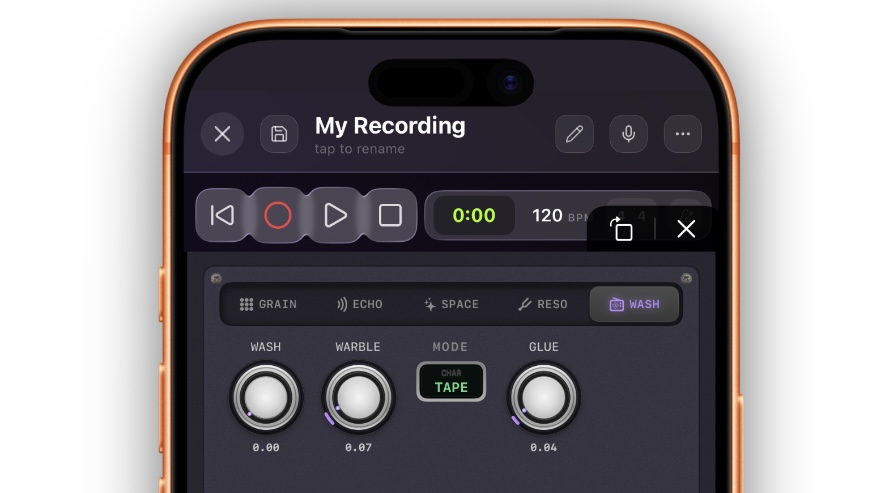
The final color stage, applied to the whole wet bed (grains + echoes + reverb + resonator) — never to your dry signal.
| Control | Range | Default | What it does |
|---|---|---|---|
| WASH 🔒 | 0.0–1.0 | 0.00 | Degrade amount — crush, noise, and bandwidth loss in one macro (Pro) |
| WARBLE 🔒 | 0.0–1.0 | 0.00 | Slow pitch instability, tape-flutter style (Pro) |
| MODE | TAPE / AM / BROKEN | TAPE | The character of the degradation: worn tape, AM radio, failing hardware |
| GLUE | 0.0–1.0 | 0.00 | Soft saturation-compression across the wet bed — melts the layers into one sound |
GLUE is free and worth using on almost every patch. Grain clouds, echoes, and reverb tails are separate layers; GLUE around 0.2–0.35 fuses them into a single wall in the way shoegaze records are a wall.
WASH + MODE is the “found recording” treatment: the whole texture behind you sounds like it is playing off a dying cassette (TAPE), coming through a distant station (AM), or disintegrating (BROKEN). WASH and WARBLE are Pro; MODE stays visible so you can hear what you are missing — the tab shows lock icons and an upgrade link when Pro is not active.
MIDI — playing the buffer
homecrate grain responds to MIDI two ways: notes play the buffer, CCs turn the knobs.
To send it MIDI in Homecrate, load the homecrate: hc_grain (MIDI) registration on a MIDI track’s instrument slot or route a MIDI track to it — see MIDI in the Studio. The KEYS button (CAPTURE panel) also opens an on-screen keyboard: one octave, octave up/down, draggable, with a LATCH toggle so held drones survive closing the popup.
Note modes (MIDI MODE, GRAIN tab)
- PLAY — the buffer becomes a melodic instrument. Held notes gate the cloud open and pitch every grain to the note (relative to ROOT), with per-note ATTACK and DECAY envelopes. Catch a chord, set SCAN to 0, and play the frozen moment like a glass keyboard.
- ROOT — the last note played re-roots the entire cloud, latching until the next note. The texture keeps flowing continuously; your keyboard just decides what key it flows in. Best for basslines re-pitching a drone.
In both modes, incoming notes are snapped up into the global keybed, so a wrong note lands somewhere right.
Control changes
Three momentary controls have user-assignable CC numbers (set them from a MIDI controller’s learn flow or automation):
| Function | Default CC |
|---|---|
| CATCH | 24 |
| FREEZE | 25 |
| RUNAWAY | 27 |
A fixed CC map covers the rest — highlights:
| CC | Controls | CC | Controls |
|---|---|---|---|
| 1 (Mod Wheel) | Spray | 102 | Delay Level |
| 7 (Volume) | Output Gain | 103 | Delay Feedback |
| 11 (Expression) | Grain Mix | 104 | Delay Time |
| 20 | Grain Size | 106 | Reverb Decay |
| 21 | Grain Density | 110 | Loop Fade |
| 22 | Grain Pitch | 111 | Clock |
| 23 | Pitch Random | 113 | Cross Amount |
| 26 | Reverse | 115 | Dry Level (expression-pedal wash-out) |
| 28 | Scan | 116 | Grain Tone |
| 29 | Grain Feedback | 117–119 | Resonator Mix / Q / Rotate |
| 85 / 86 / 87 | Drive / Glue / Wash | 91 | Reverb Wet |
CC changes are captured even with the editor closed, and they save with the project.
Presets
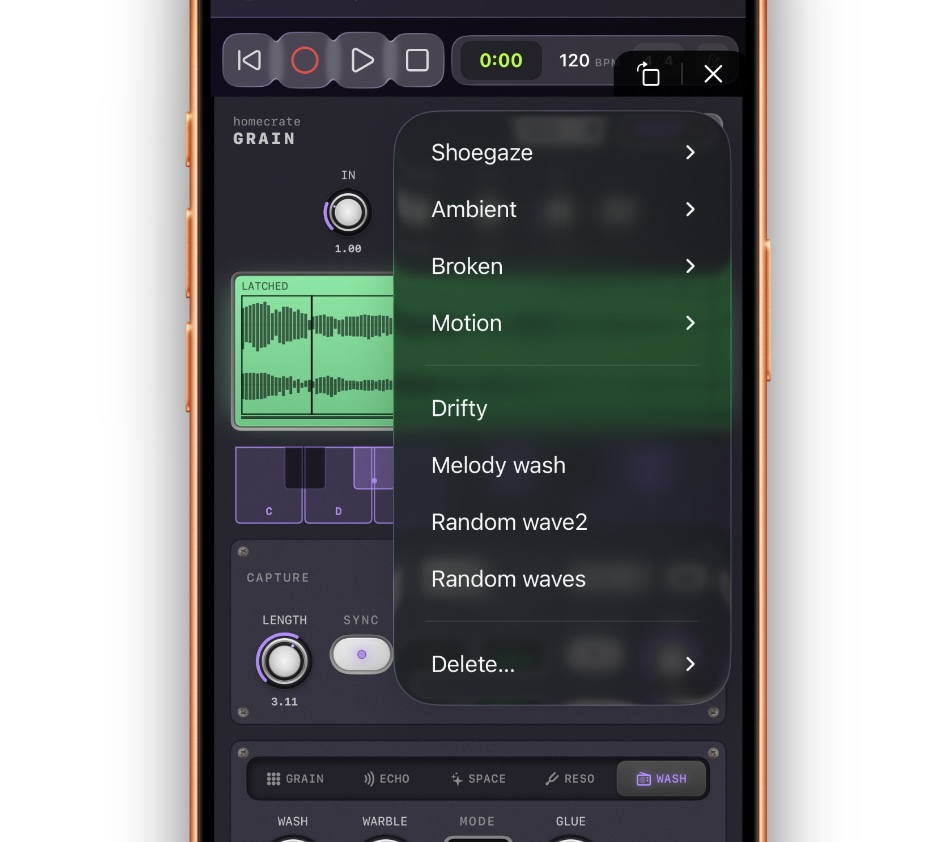
The PRESETS menu (header) holds the factory catalog, grouped by character, with your saved presets below it. Every factory preset is a full composition — grains, routing, space, and color together, never a single effect. Loading one sets every parameter, so a stuck latch or leftover setting never bleeds through.
| Category | Preset | The sound |
|---|---|---|
| Shoegaze | Washed Out 🆓 | The starting point: wide grain bed, dark echoes, big tail, glue |
| Shoegaze | Shimmer Cathedral 🆓 | Octave-quantized shimmer swarm; echoes bloom only inside the reverb |
| Shoegaze | Undertow | Octave-down sludge — everything slowed and darkened, reverse grains crawling underneath |
| Ambient | Frozen Choir 🆓 | Slow still-point cloud of quantized random pitches — freeze it and play over the bed |
| Ambient | Tape Ghost | Catch-mode moment stack that slowly fades while tape wash smears it |
| Ambient | Sympathy Strings | High-Q resonator chord humming along with everything, slow morph |
| Broken | Bad Signal | AM-radio wash over a clocked-down bed; the echoes share the broken speaker |
| Broken | Dust Storm | Tiny grains, huge spray — playing harder scatters the swarm |
| Motion | Runaway Swell | Tape echoes fed back into the buffer, returning as reverse grains — swells that feed themselves |
| Motion | Glass Keys | MIDI PLAY over a caught moment — the freeze as a playable keyboard |
| Motion | Microloop Stutter | Beat-synced micro-loop chopped into a synced ping-pong echo |
🆓 Washed Out, Shimmer Cathedral, and Frozen Choir load without Pro. The rest are visible but show the upgrade prompt — as does SAVE for your own presets. User presets are stored per-device, follow you into every project, and hold the complete plugin state.
Signal Path Reference
Input (stereo)
    │
    ▼
IN gain → DRIVE (saturation)
    │
    ├──────────────► DRY path (untouched from here on)
    │
    ▼
CAPTURE BUFFER  ◄── SOURCE: input / input+FX / FX only
    │    8 s rolling · CATCH latches a region · FREEZE halts it
    │    ◄── grain FEEDBK · ◄── delay ROUTE: RING
    ▼
GRAIN ENGINE ── up to 48 simultaneous grains
    │    size/density/spray/pitch (QUANT → keybed) · TONE · MIX
    │
    ├──► DELAY  (SEND: input/grains/both → ROUTE: out/verb/ring/wash)
    ├──► RESONATOR  (6 bands tuned to the keybed, MIX return)
    ▼
WET BED  ◄── REVERB (fed by the bed + DRYFEED)
    │
    ▼
WASH (degrade macro, Pro) → GLUE (bus saturation-compression)
    │
    ▼
OUT  =  DRY × DRY-level  +  wet bed  →  OUT gain
Two rules the routing always keeps:
- Your dry signal is never processed past DRIVE. Texture is additive; the instrument stays playable. DRY at the end is the only control that touches it.
- The engines never stop. Freeze halts only the capture buffer — delay and reverb tails keep decaying naturally over the hold, and every mix knob is a pure level, so nothing pops or truncates.
Starting Points
1. Shoegaze wall behind a guitar
| Section | Setting |
|---|---|
| GRAIN | MIX 0.5, SIZE 180, DENSITY 24, SPRAY 0.35, SPREAD 0.8 |
| Master | DRIVE 0.2, DRY 0.7 |
| ECHO | LEVEL 0.25, TIME 420, FEEDBACK 0.45, TONE 0.5 |
| SPACE | WET 0.45, DECAY 0.75, SIZE 1.4, TONE 0.55 |
| WASH | GLUE 0.25 |
(This is essentially the Washed Out preset.) The two knobs to ride live are DRY — sink the guitar into the wall — and GLUE — how much the wall is one sound.
2. Frozen ambient bed to play over
| Section | Setting |
|---|---|
| Keybed | Your song’s key |
| GRAIN | MIX 0.6, SIZE 300, DENSITY 28, SPRAY 0.6, QUANT on, RANDOM 0.55, SCAN 0.15, SHAPE Swell |
| SPACE | WET 0.5, DECAY 0.8, SIZE 1.6 |
| LFO | TARGET Scan, SINE, 0.1 Hz, DEPTH 0.3 |
Play a chord, tap FREEZE, and the bed hangs while the LFO drifts the playhead through it. Solo over the top; tap FREEZE to move to the next chord.
3. Self-playing drone machine
| Section | Setting |
|---|---|
| CAPTURE | SOURCE FX |
| GRAIN | MIX 0.55, FEEDBK 0.4, REVERSE 0.4, SPRAY 0.5 |
| ECHO | SEND GRAINS, ROUTE RING, LEVEL 0.35, TAPE on, FEEDBACK 0.6 |
| SPACE | WET 0.35, DECAY 0.7 |
| WASH | GLUE 0.3 |
Echoes re-enter the buffer and come back as grains; the buffer hears only the effects. A single strummed chord starts a system that plays itself — your instrument becomes the spark, not the source. Pull DRY to 0 and perform entirely with CATCH, FREEZE, and RUNAWAY.
Pro vs Free
| Free | Pro | |
|---|---|---|
| The plugin itself (loads on any track) | ✅ | ✅ |
| LIVE + CATCH capture, FREEZE, loop files | ✅ | ✅ |
| Full grain engine, CLOCK, CROSS, both LFOs | ✅ | ✅ |
| Delay with all four routes, RUNAWAY | ✅ | ✅ |
| Reverb, resonator, GLUE | ✅ | ✅ |
| MIDI modes, keyboard, full CC map | ✅ | ✅ |
| Factory presets: Washed Out, Shimmer Cathedral, Frozen Choir | ✅ | ✅ |
| Full factory catalog (11 presets) | — | ✅ |
| Save / delete your own presets | — | ✅ |
| OVERDUB — the moment stack | — | ✅ |
| WASH + WARBLE — the degrade suite | — | ✅ |
The free tier is deliberately a finished instrument — capture, freeze, grains, echoes, space, and glue with nothing crippled. Pro adds the layering and destruction stages on top.
Tips
- Set the keybed first, like setting KEY on a tuner plugin. QUANT, the resonator, and MIDI all read it — one tap wrong here and every pitched feature disagrees with your song.
- The buffer is always listening. CATCH grabs what you already played — so play the phrase first, then catch it, rather than arming and performing on cue.
- If you hear nothing, read the LCD: no waveform means no input reaching the buffer; waveform but no dots means MIX or DENSITY is down.
- Double-tap any knob to return it to its default.
- DRY is a performance fader. Map it to an expression pedal (CC 115) and you can sink the instrument into the texture and pull it back out in real time.
- SPRAY is the past-vs-present knob. Low spray shadows what you just played; high spray plays your whole last eight seconds at once.
- Route the delay to VERB when echoes clutter the mix — they bloom inside the tail instead of repeating dry.
- Route the delay to RING and raise grain FEEDBK for textures that regenerate — then treat CATCH/FREEZE as your brakes.
- GLUE around 0.25 is the difference between “several effects running” and “one sound.”
- Freeze responds to CC 25 — a footswitch turns held-chord freezes into a hands-free pad technique.
- With a loop file pinned, RELOAD is your undo for overdubs — the file on disk is never overwritten.
- The plugin is rendered into mixdowns and stems with the rest of your insert chain — see Mixdown & Export. To bake a frozen texture into an audio clip, set a track input to Plugin Output and record it — see Arming Tracks & Input Monitoring.
Next steps
- What plugins are and how Homecrate hosts them: Plugins Overview
- Loading and removing plugins: Loading & Removing Plugins
- Automating SCAN, DRY, RUNAWAY, or any other control: Automation
- The other side of the texture coin — pitch + space on a voice: homecrate vocal
- Rendering the finished texture: Mixdown & Export